
Solutions
Modern PMIS for AI Data Center Builds
Owner-side PMO
Built for owners who carry the schedule risk.
Energization is the date that matters, and the owner carries the exposure between the campus build and the power build. TerraForge is the owner PMIS for that exposure — portfolio, programme and project on one set of records. It does not clear an interconnection queue, and it does not shorten a lead time.
01
Every megawatt, on one schedule of record.
Schedule Manager holds the critical path, the baseline and the float on the programme or the project. The portfolio dashboard reports that finish. Primavera P6 comes in by XER or XML and updates in place; keep the TerraForge baseline and slippage is computed here. The utility’s date stays the utility’s. You can see it on the same schedule as the hall.
Schedule of record02
Control the long-lead path before it controls you.
Transformers, switchgear and generators move on their own clock. A submittal can hold lead time, anticipated delivery and actual delivery, and be flagged critical path. The schedule activity can carry the cost code. Cash flow can take its months from those dates and shows drift when they move. A late delivery shows up as slippage and as a draw.
Long-lead on the record03
Roll up every campus, phase, and hall.
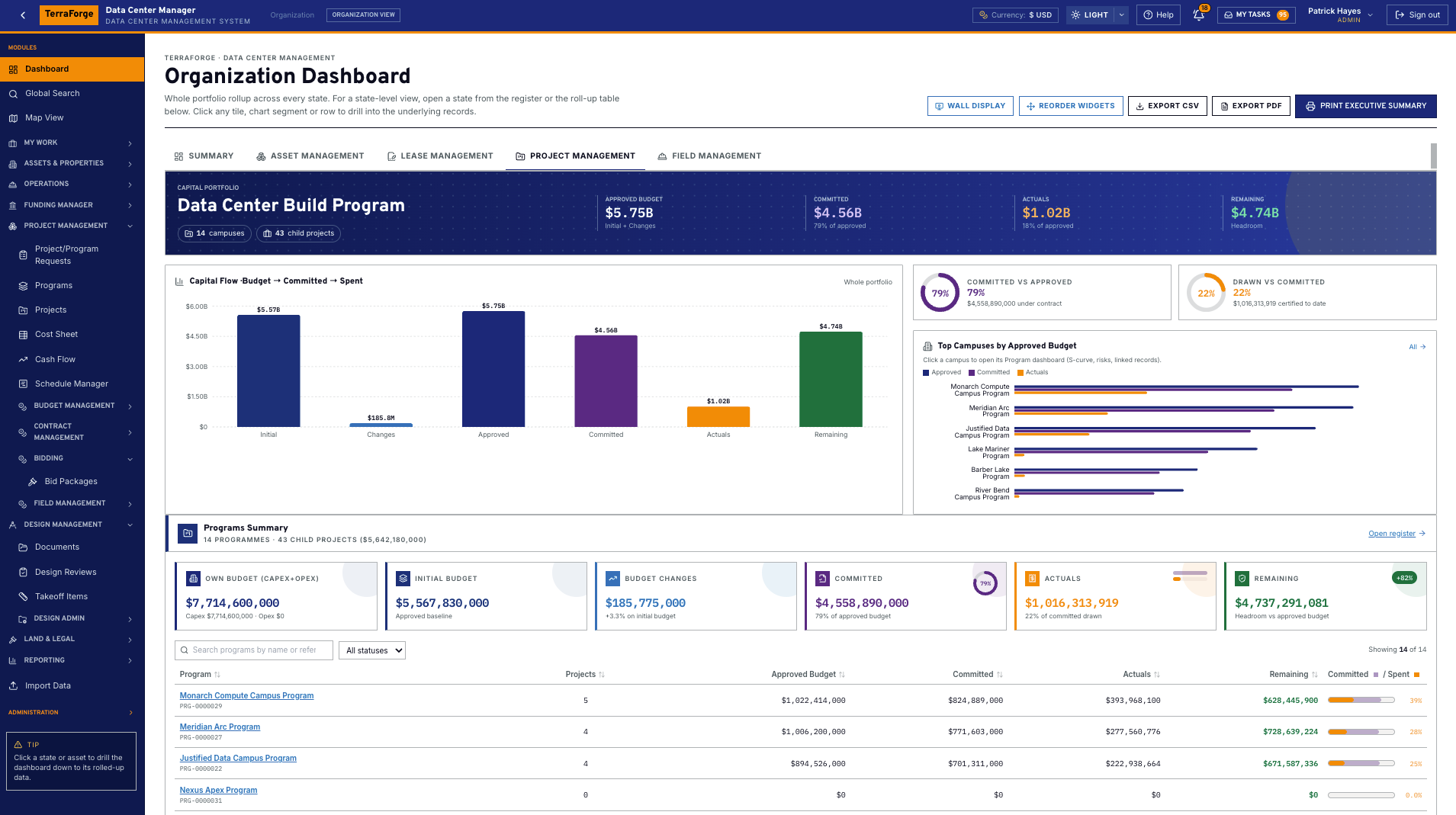
The organisation cost sheet rolls the programmes. A programme cost sheet breaks down by project. The project sheet is the cost codes — pending and approved apart. The portfolio dashboard reads budget, committed, spent and forecast at completion from those records. The risk heat map reads the risk register. State dashboards scope the same picture.
Portfolio, programme, project04
Find any record. Open it. Come back.
Most legacy PMIS make you hunt module by module. Global Search finds an asset, a project, a schedule, a drawing or a contract — and every other register and published custom app — then opens the live record and returns you to the results.
Global Search05
Give PMO and finance the same numbers, every week.
Freeze a cash-flow baseline and compare the forecast to it. Take a snapshot of the project or the whole portfolio — label it for the board pack — and compare it with the live plan. Actuals are approved payment applications. Forecasted total cost on the cost sheet is the figure the pack exports.
Cash flow and the board pack06
From first award to handover, under owner control.
A bid package prices a frozen bill of quantities, seals the returns, and drafts the contract from the award. Drawings keep every revision. Takeoff and the bid pin to the revision issued for takeoff, and compare shows what moved when density or cooling changes the design. Closeout submittals — O&M manuals, warranties, as-builts — stay on the project with the permit and the daily report.
Bid through contract
- Owner-side PMO
- Portfolio roll-up
- Global Search
- Programme controls
- Long-lead visibility
- Cash flow forecasting
- Change control
- Multi-phase delivery
- Schedule of record (P6)
The exposure
When energization is the date that matters.
Time to power is not a construction duration, and a moved energization date is a financing problem as much as a site problem. TerraForge gives the owner’s PMO one place to see that date, the commitment on the long-lead gear, and the cash-flow consequence. It does not get a project through an interconnection queue. Turnkey for day one — campuses, cost codes, schedules, bids and field records ship with the product. App Builder is how the programme team publishes the next form after go-live.
Control model
Portfolio, programme, project.
Hyperscale delivery runs in that order: the wave, the campus, the data hall. Funding is visible at each level. Cost sheets roll up and compare. Dashboards sit on each record.
The operating system
The records behind the build.
From the wave, to the campus, to the hall, to the contract, then the work that keeps the asset. Each link is a working record — not a slide.
01
Capital programme
Budget first. Then the contract, the change, the application, the schedule of values, the draw, and the date. Funding Manager follows for owners who separate sources.
02
Portfolio control
The owner’s view of the wave: campuses, money, MW and risk, with a cockpit for the room.
03
Programme delivery
Primavera P6 comes in by XER or XML and updates the same schedule in place.
04
Project execution
The hall itself: drawings and takeoffs, the controlled document set, RFIs and the field record.
05
Maintenance
After energization, work orders on campus assets draw against approved master agreements for power, cooling, fiber and fire and life safety.
06
Bidding
From a secure vendor bid to the contract the award becomes.
Funding Manager
Colors of money, visible from the portfolio to the project.
The cost sheet says what a campus will cost. Funding Manager says where the money comes from, and keeps each source intact through allocation, change and reversal.
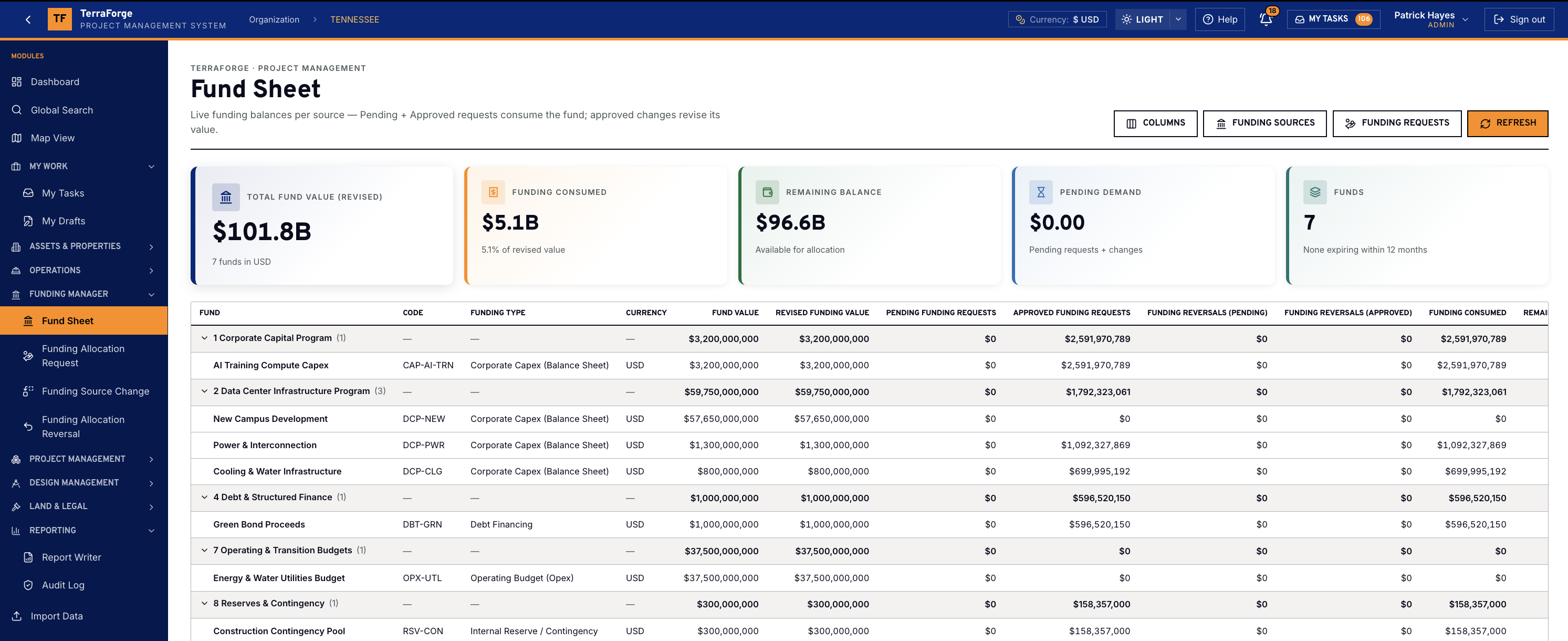
The Fund Sheet is the portfolio view. An allocation names the programme or the project it funds. The organisation, programme and project cost sheets show Funding Allocations (Approved) and Budget vs Funding Δ. The project dashboard shows Funding Approved beside that same gap.
- Funding Sources
- The pots. The fund code locks the name, the type and the funding-breakdown group. Original amount, base currency and, for time-limited money, an expiration date.
- Fund Sheet
- One row per source, grouped by that structure. Revised value, consumed, remaining (revised minus consumed minus pending), pending demand, and how many funds expire within 12 months. A mixed-currency group is marked Mixed.
- Allocation request
- Draws from one or more sources. The split must total 100%, and priority 1 is consumed first. The target is a programme or a project. The request total is that record’s approved budget position.
- Source change and reversal
- A change revises a pot’s value. The original amount never changes. A reversal returns an approved allocation in the same proportions. Approved requests cannot be edited, re-split or deleted.
Where the owner reads it
Portfolio, programme, and project — the same colors.
01
Portfolio
Fund Sheet for every pot. The organisation cost sheet shows Funding Allocations (Approved) and Budget vs Funding Δ.
02
Programme
A Funding tab on the programme. An allocation can name it. The cost sheet breaks that funding out by project.
03
Project
A Funding tab on the project. The request total is its approved budget. The dashboard shows Funding Approved and Budget vs Funding Δ.
Funding types on the fund code
- Corporate capex
- Debt financing
- Government grant
- Partner equity
- Operating budget
- Lease / sale-leaseback
- Vendor / OEM financing
- Customer prepayment
Approved allocations are immutable. Money returns only through a reversal. A pot’s value changes only through a source change. Pending demand stays off the approved column until the workflow says so. Numbering is FS, FR, FCR and FRV.
Where to start
The data center programme, then the rest of the PMIS.
Power · shell · hall · maintenance
AI & Data Center Builds
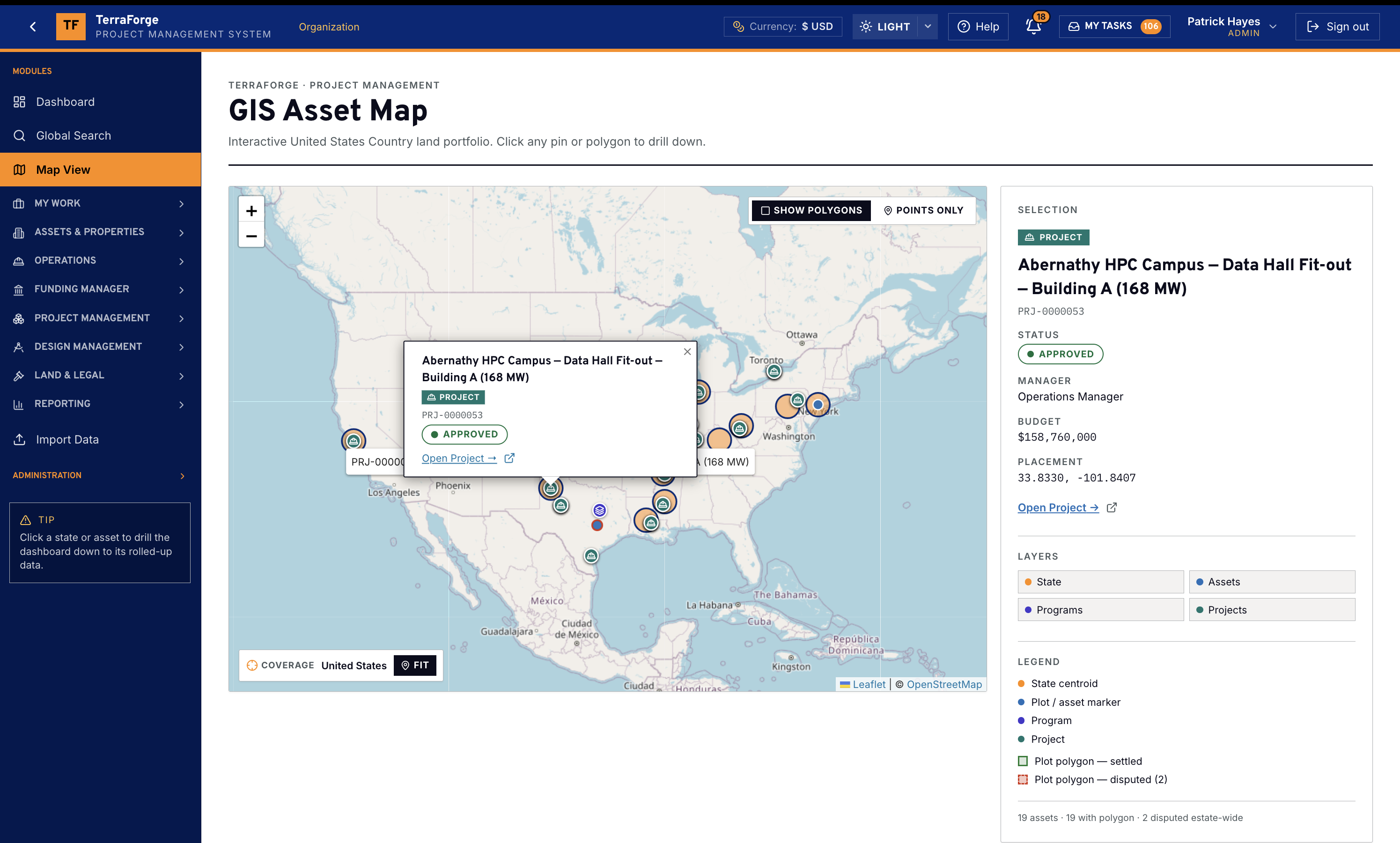
The full build-out, not the fit-out alone. Energy and the campus, the shell package and the data hall, then work orders and master agreements on the asset.
Walk the programme →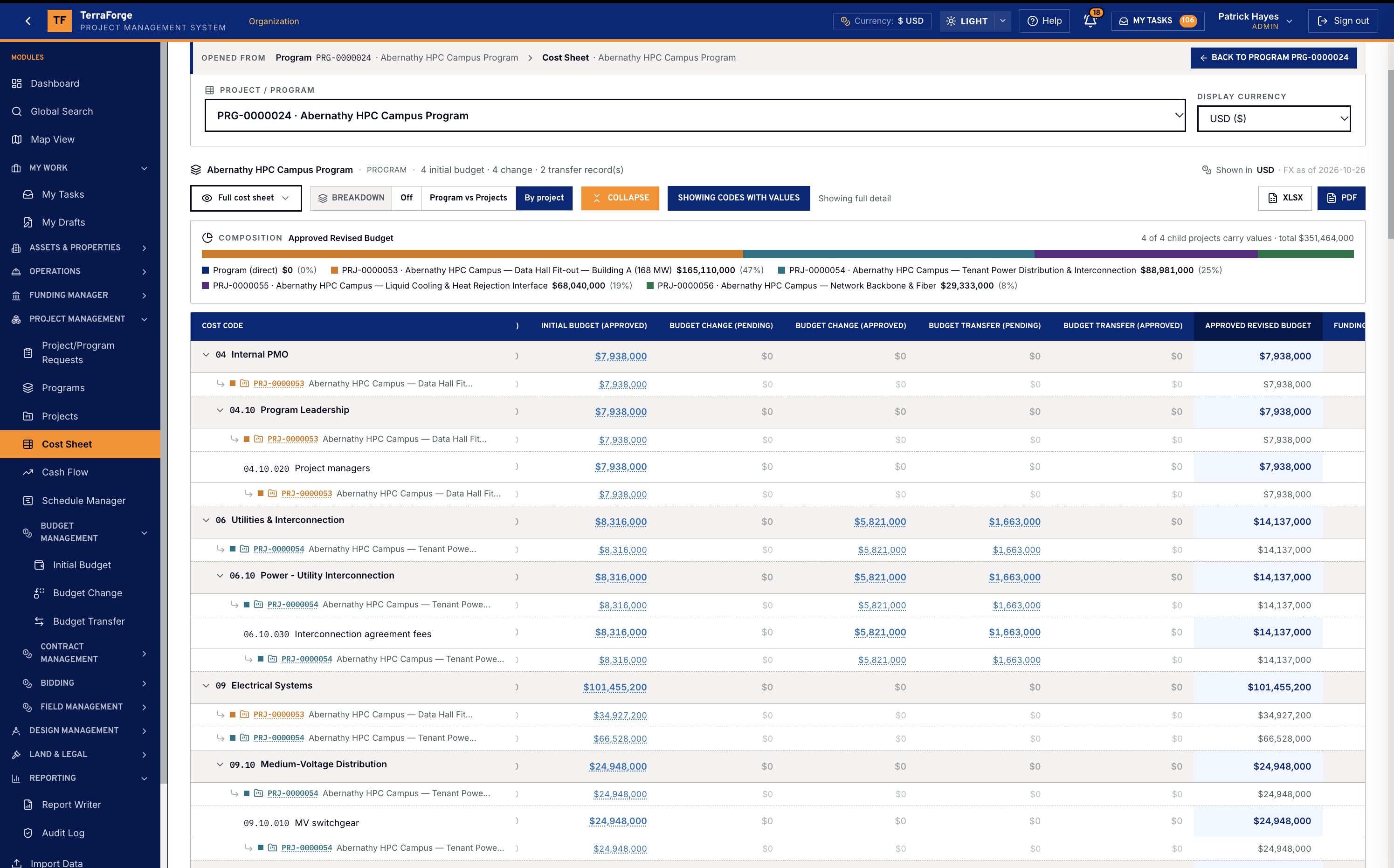
Cost Sheet · Schedule · Fund Sheet
Capital Programmes
Programme Cost Sheet rolls up from child projects — Initial, Changes, Transfers, Revised. Most legacy PMIS stop at the project sheet. Funding Manager keeps every color of money. Primavera P6 comes in by XER or XML and updates in place.
Walk the money →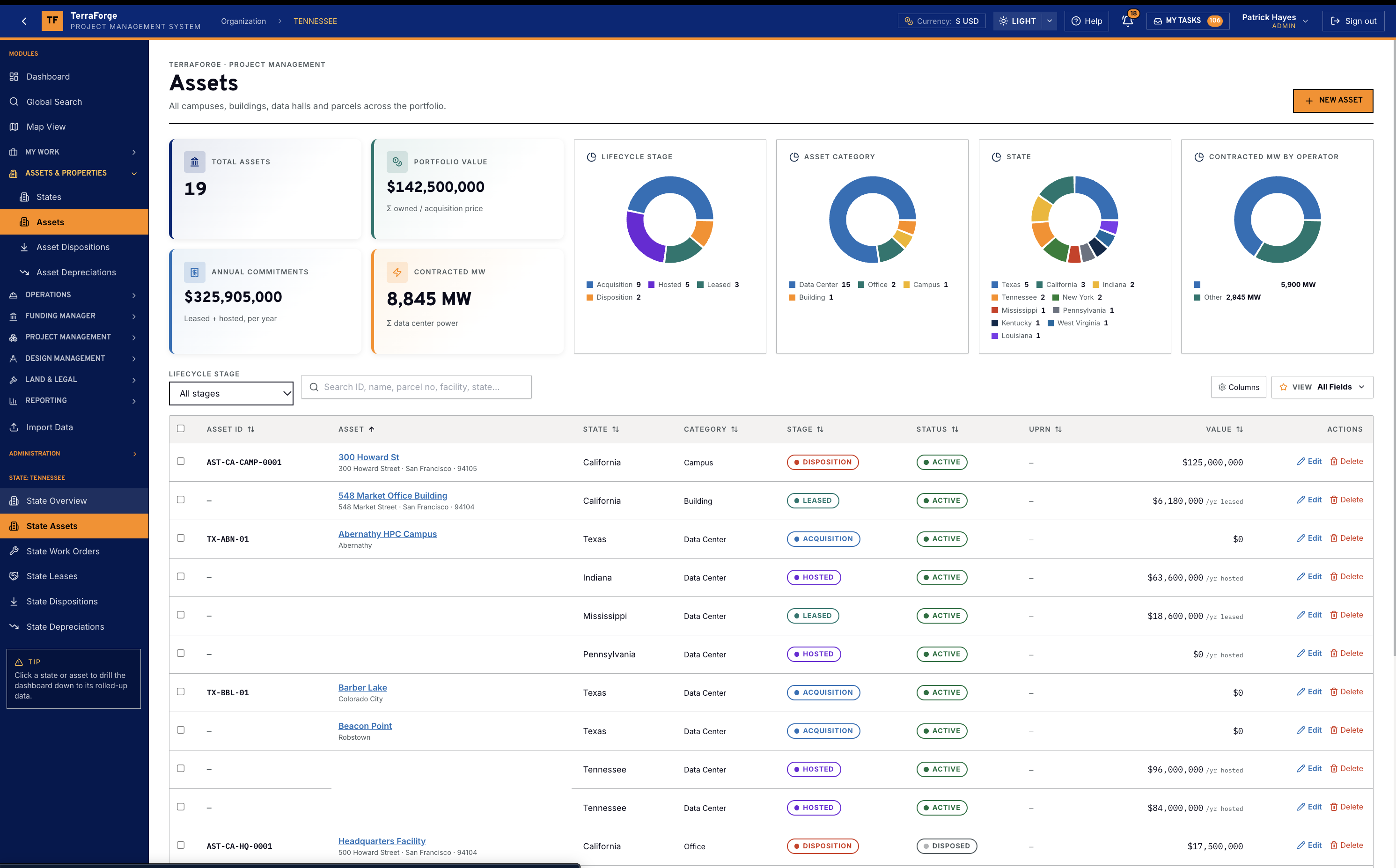
Assets · MW · work orders
Portfolio & Campuses
State holds utility, ISO and contracted megawatts. The campus, hall, substation and generator yard are assets. Vendors, work orders and blanket purchase orders maintain them.
Walk the portfolio →App Builder and workflow live on Workflow & Designer and on Configure.
By industry
Also used for.
Open solutions by industry






See the full PMIS against your campus programme.
Your cost codes, your workflow, your campuses. Write sales@terraforge.build.