
01
Three tools, one feed
The tab is titled for Power BI, Tableau and Excel. They read the same tables. Refresh stays in the tool.
Reporting feed
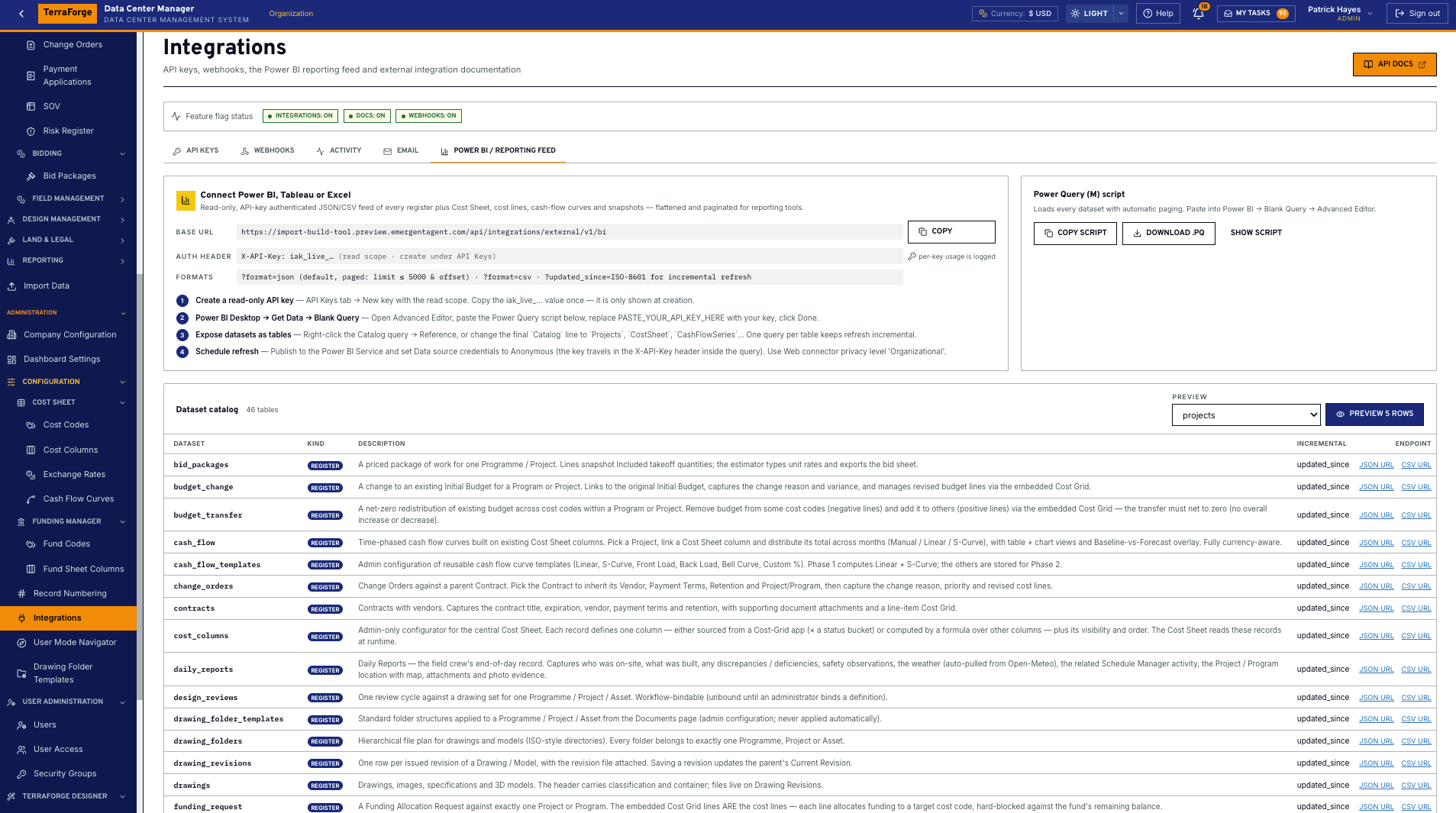
On the reporting feed tab
One read-only key. JSON or CSV, paged. Registers, the cost sheet, cost lines, cash-flow curves and snapshots. Not a second ledger.
01
Desktop → Get Data → Blank Query. Paste the Power Query (M) script from the tab. Schedule the refresh in the service.
02
The same feed URL and the same read-only key. Tableau is named on the tab. The refresh stays in Tableau.
03
Reference the catalog query and expose the dataset as a table. When the pack is a file, Report Writer writes XLSX.
01
Read-only key
API Keys. Read scope. Copy the value once at creation.
02
Power BI
Desktop, Get Data, Blank Query. Paste the Power Query (M) script. Put the key in the placeholder.
03
Tables
Reference the catalog query, or point the last line at the dataset you want. That is the Excel path too.
04
Refresh
Schedule it in the Power BI service. Credentials anonymous. The key rides in the header.
01
The tab is titled for Power BI, Tableau and Excel. They read the same tables. Refresh stays in the tool.
02
Create it on the API Keys tab, with the read scope. It is shown once. The feed does not include users or secrets.
03
Organisation, state, programme and project dashboards answer the week. The feed does not become a second ledger.
On the tab
The feed is read-only and API-key authenticated. JSON is the default, paged. CSV is the other format. An updated-since parameter supports incremental refresh. The dataset catalog lists every table on the feed — registers, the cost sheet, cost lines, cash-flow curves and snapshots — flattened, with picker fields resolved.
Power BI Desktop pastes the Power Query (M) script into a blank query. The script pages every dataset. Tableau uses the same URL and the same key. Excel exposes those datasets as tables from the catalog query. None of this is a certified marketplace connector, and none of it writes back.
The Operations Wall and the in-product dashboards are not this feed. They read the PMIS. The feed is how finance takes the same numbers into the tool they already refresh.
When the pack is a file
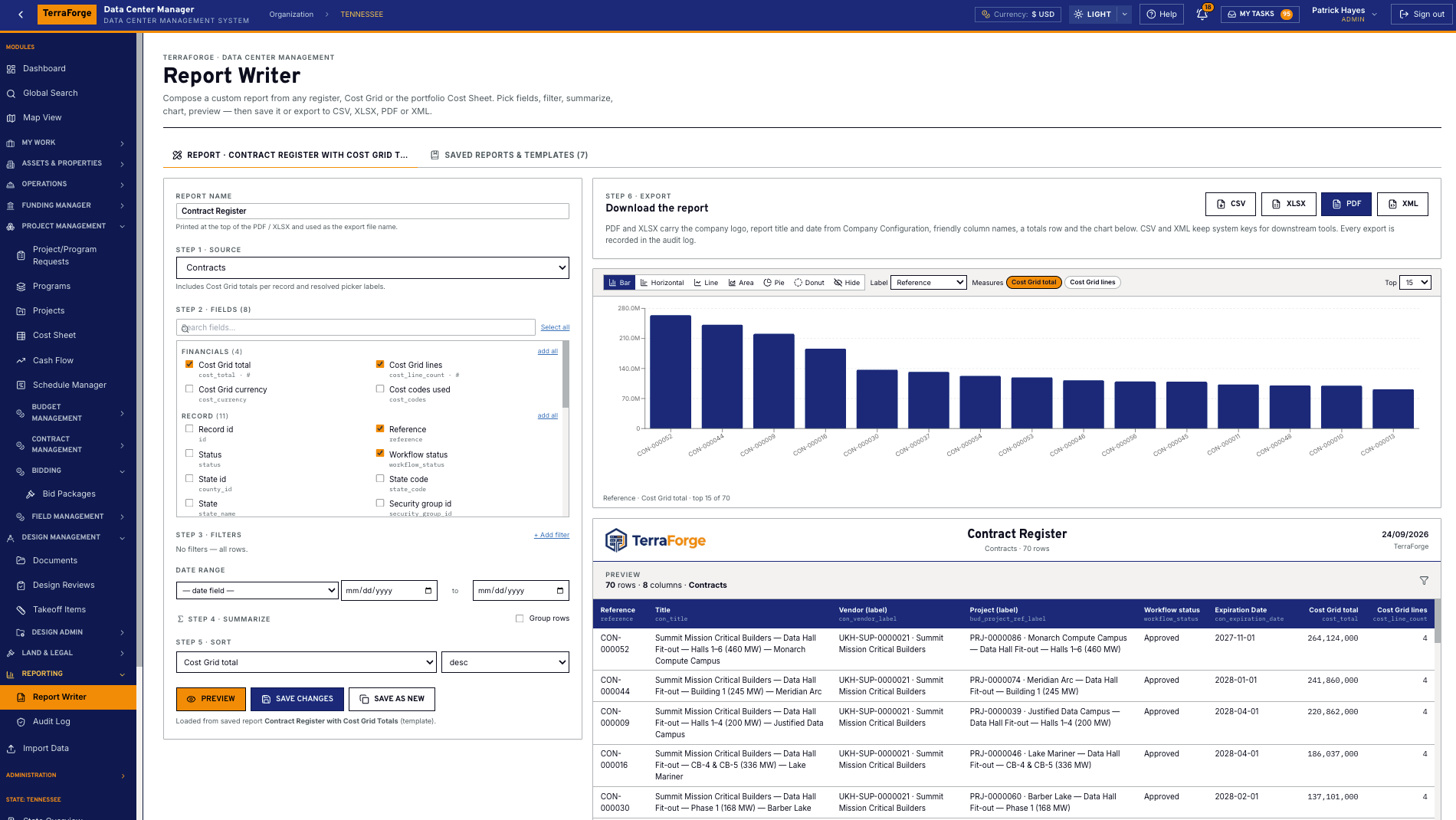
Report Writer composes a report from any register, a cost grid or the portfolio cost sheet. Pick fields, filter, summarize, chart, preview, then export. CSV, XLSX, PDF and XML. Every export is in the audit log. The organisation dashboard also exports CSV and PDF.
Use the file when someone needs a pack. Use the feed when the workbook should stay live. The bid comparison matrix and the cash-flow series export to Excel as well. Those files are snapshots of the record, not a place to maintain it.
The programme team owns it. Same navigation at portfolio, programme and project. Same My Tasks inbox. App Builder publishes the next step on a Tuesday, without a vendor ticket.
What ships
Your cost codes, your workflow, your campuses. Write sales@terraforge.build.