Skip to content
TerraForgeTerraForge

Modern PMIS for AI Data Center Builds

Five levels. A dashboard on each.

The organisation is the wave. State, in the US data center configuration, is the portfolio. The programme is the campus. The project is the package. The asset is what gets built and then maintained. Cost sheets roll and segment. The Operations Wall is only the organisation dashboard, full screen, for a review.
TerraForge organisation dashboard for a demonstration data center portfolio
Organisation · state · programme · project · asset
  1. 01OrganisationThe books02Portfolio / StateThe region03ProgrammeThe campus04ProjectThe package05AssetThe thing built

01

The books

Organisation

The whole wave, before a campus is opened.

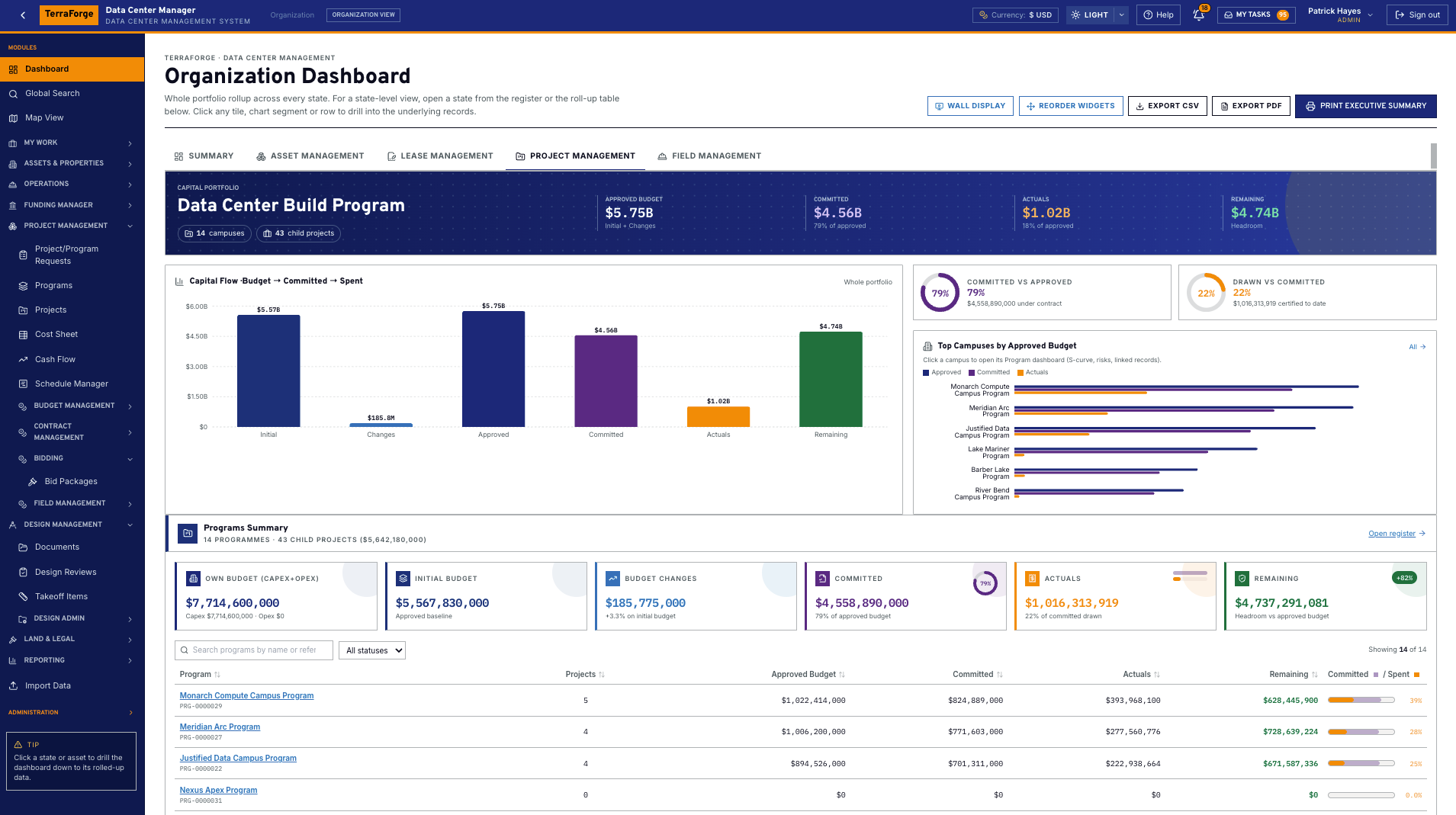
The organisation dashboard is the first screen after sign-in. It rolls portfolio cost, open work, approvals and field activity. Every number opens the register behind it. The organisation cost sheet is where programmes and standalone projects land.

Dashboard
Scope is the whole organisation. It ignores the campus picker on purpose. Wall Display is this dashboard in a full-screen kiosk — the review screen, not a second system.
Cost
Programmes roll here. A standalone project with no parent programme rolls here directly.
On the record
Pipeline health, field activity by campus, export to CSV or PDF.
TerraForge organisation dashboard for a demonstration data center portfolio, with approved budget, commitment, actuals and programme roll-up
Organisation dashboard. Demonstration tenant. Wall Display is this screen in a kiosk, not a separate product.

02

The region

Portfolio / State

State is the portfolio a hyperscale owner actually chairs.

In the US data center configuration, State is the branded portfolio level — the guide’s county or region. Utility, ISO or RTO, and interconnection status from Not filed to Energized are recorded here. TerraForge does not clear the queue.

Dashboard
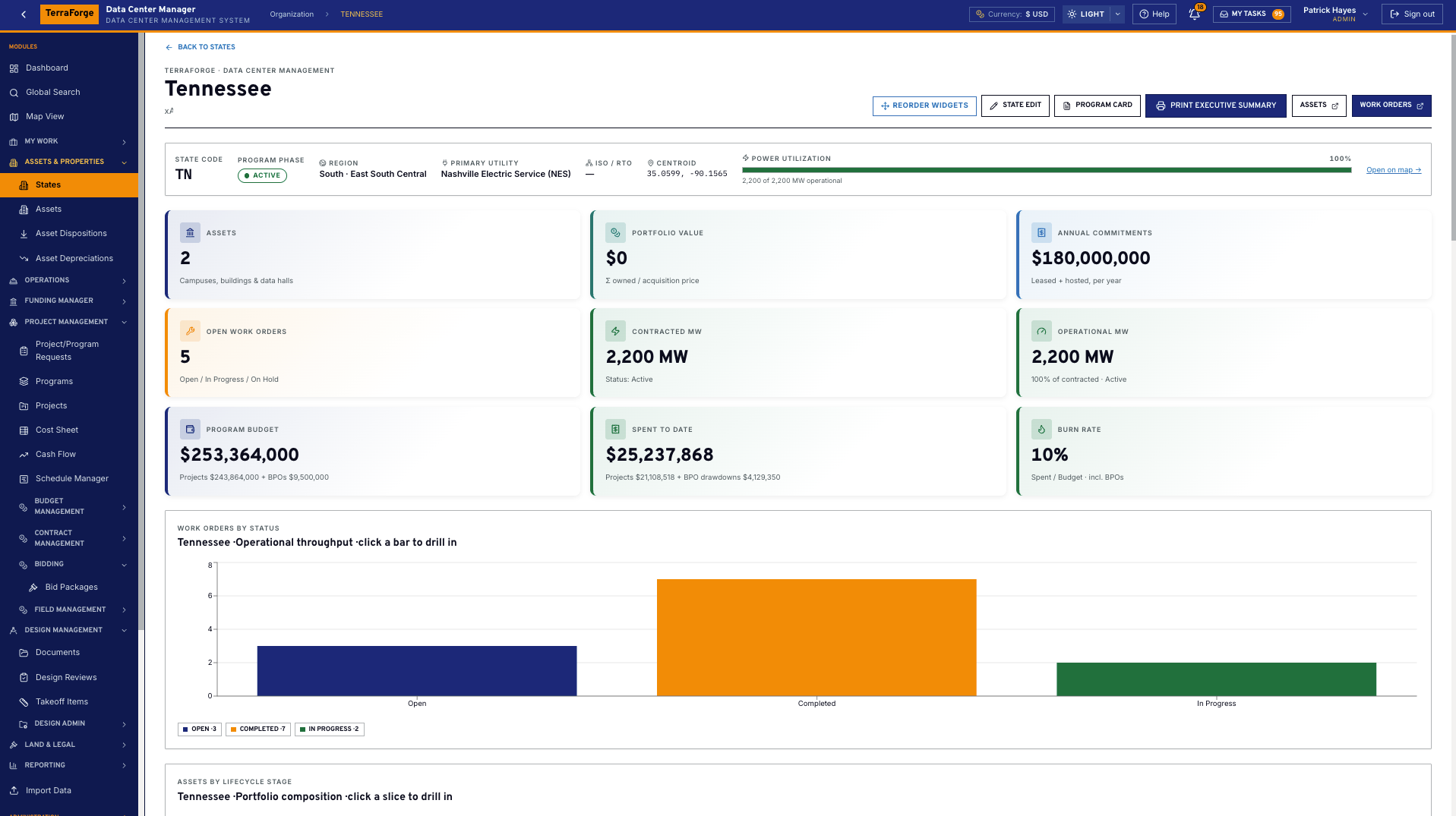
The state page holds contracted and operational megawatts, land, data halls and substations. Power utilization is operational divided by contracted MW.
Cost
Programme value on the state is project budget plus blanket-purchase-order commitments scoped to that state. The cost sheet can be segmented by state.
On the record
Primary utility, interconnection status, capex envelope, annual opex.
TerraForge state dashboard for a demonstration portfolio region, with contracted megawatts, assets, work orders and programme budget
State dashboard. In the US data center configuration this is the portfolio level. Megawatts, assets and work orders. Demonstration environment.

03

The campus

Programme

One campus, or one power thread, held as a programme.

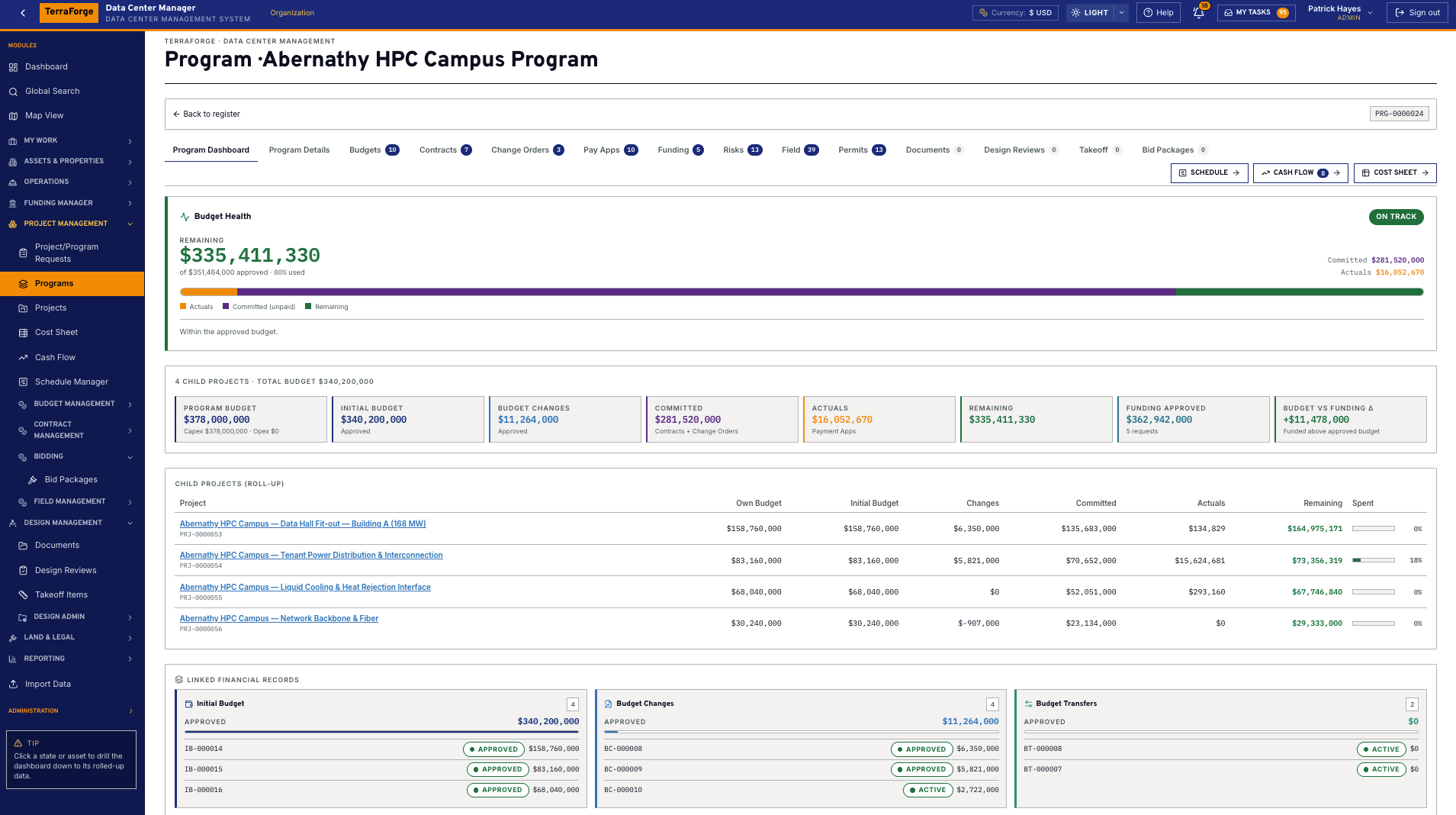
A programme is the container a PMO chairs: a multi-hall campus, a power programme, a cooling programme. Child projects roll into it. The cash-flow curve and the schedule are read here when the question is the campus.

Dashboard
Budget, commitment, burn and open risk, scoped to the programme you opened. Same widgets as the organisation, not a different product.
Cost
The programme cost sheet sums its own lines and every child project. Break it Off, Program versus Projects, or one row per project.
On the record
Funding tab. An allocation can name this programme. Bid packages can price it.
TerraForge programme dashboard with budget health, child-project roll-up, and tabs for contracts, change orders, pay apps, funding, documents, design reviews, takeoff and bid packages
Programme dashboard. Demonstration campus. Child projects roll up. The cost sheet is the next click.

04

The package

Project

The hall, the yard, the package — where the work is approved.

A project lives under a programme, or stands alone and rolls straight to the organisation cost sheet. This is the WBS, the contract, the drawing revision, the RFI and the bid.

Dashboard
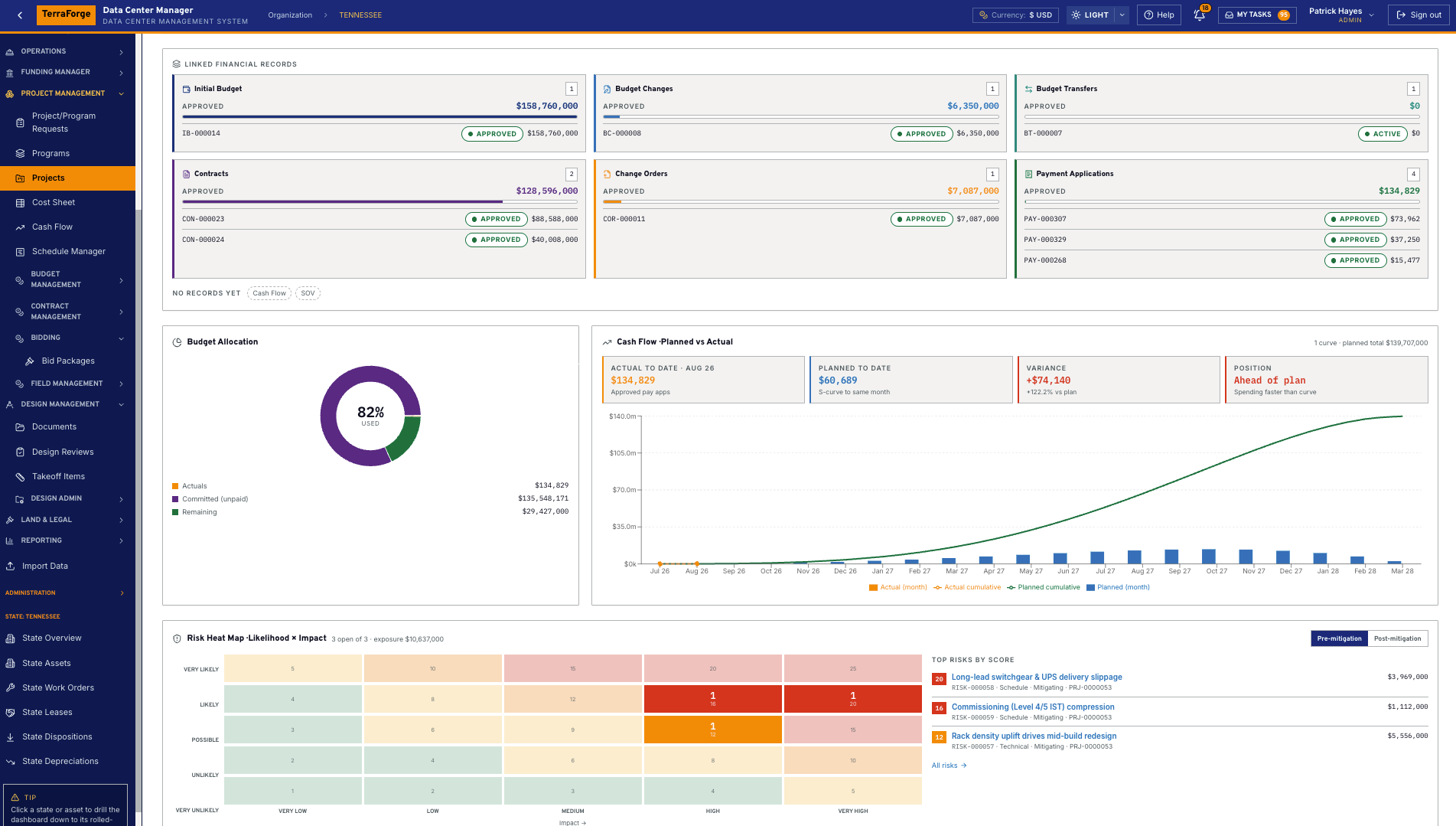
RAG against remaining, Funding Approved, Budget versus Funding, cash flow, risk heat and the map pin. Click a tile and the business process is underneath.
Cost
The project cost sheet is the cost codes: generators, racks, PDUs, chillers, MV switchgear, cooling towers, liquid cooling. Pending and approved stay in their own columns.
On the record
Schedule, takeoff, permits, pay applications, funding allocation aimed at this project.
TerraForge project dashboard with contracts, change orders, payment applications, cash flow and a risk heat map
Project dashboard. Contracts, change orders and payment applications sit on the record. Cash flow and risk beside them.

05

The thing built

Asset

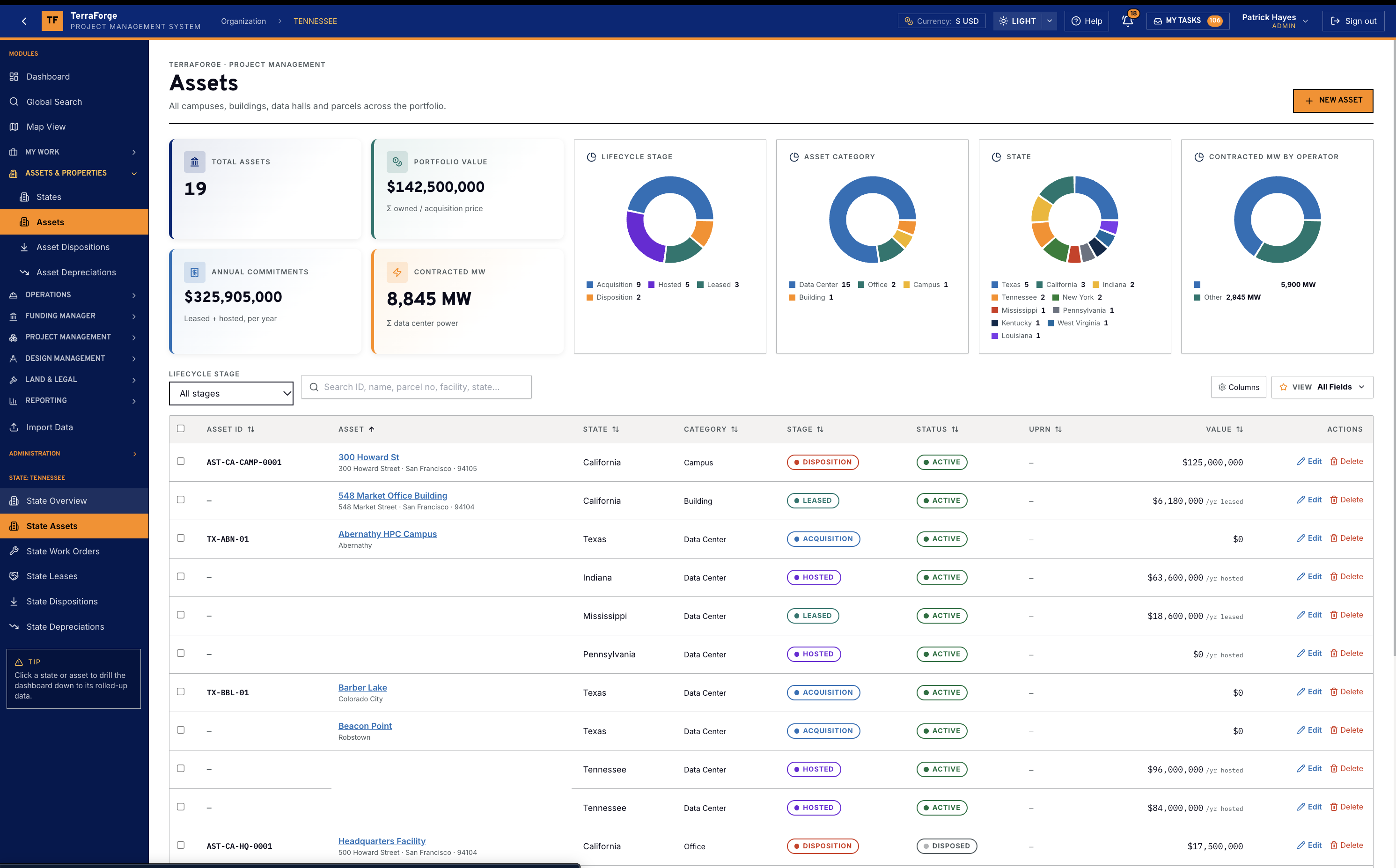
The register counts the campuses, the megawatts and the value.

Assets are Campus, Building, Data Center, Data Hall, Substation, Generator Yard, Office and Parcel. The facility profile holds operator, tier, contracted and operational megawatts, PUE, redundancy, utility feeds, cooling and white space. Those figures roll to the state and the organisation.

Dashboard
Cards across the top: how many assets, portfolio value, annual commitments, contracted megawatts. Donuts for lifecycle, category, state and megawatts by operator. The register is the list under the cards. Click a state or an asset and the dashboard drills to that roll-up. This demonstration register shows 19 assets and 8,845 MW contracted.
Cost
Work-order completion charges the blanket purchase order once. The state programme value already includes those commitments.
On the record
Drawings can belong to the asset. Vendors do not sign in to the work order.

TerraForge assets dashboard with portfolio cards for asset count, portfolio value, annual commitments and contracted megawatts, plus lifecycle, category and state charts and the asset register
Assets. Demonstration register. Portfolio cards, then the list. Click a state or an asset and the dashboard drills to that roll-up.

Programme cost sheet

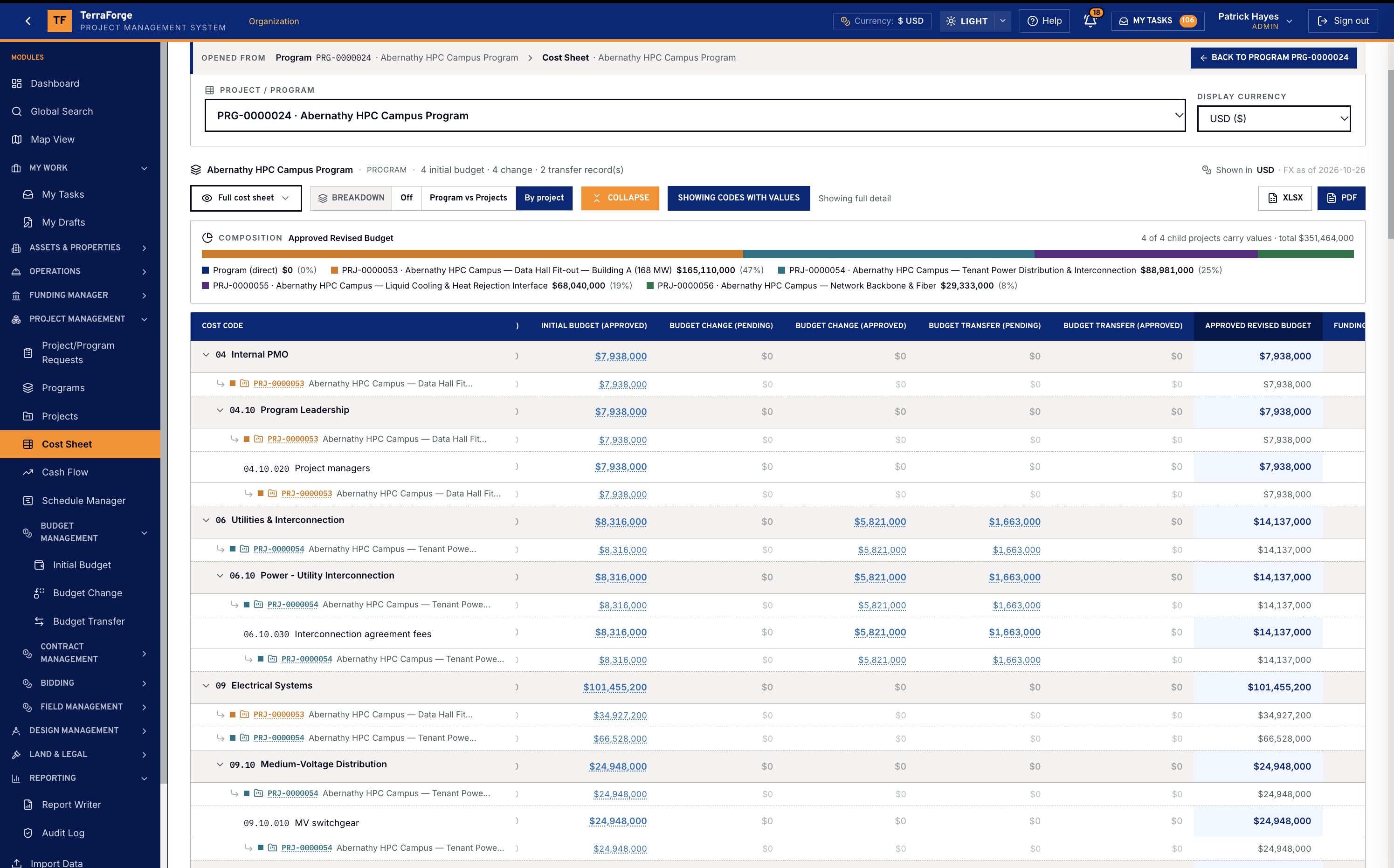
The programme sheet rolls up from the child projects.

Programme Cost Sheet rolls up from child projects — Initial, Changes, Transfers, Revised. Most legacy PMIS stop at the project sheet. Abernathy HPC Campus Program is the demonstration. The composition bar is the child projects summing into Approved Revised Budget.

Hall against yard against substation is the drill, not an export rebuilt on Friday. The organisation sheet is the same arithmetic one level up. The project sheet is the cost codes.

TerraForge programme cost sheet for Abernathy HPC Campus Program, composition bar of child projects summing into Approved Revised Budget
Abernathy HPC Campus Program. The composition bar is the child projects summing into Approved Revised Budget. Most legacy PMIS stop at the project sheet.

Funding on the three money levels

The Fund Sheet is the portfolio. The allocation names a programme or a project.

Portfolio

The Fund Sheet is the portfolio view of every pot: revised value, consumed, remaining, pending demand, and funds expiring within 12 months. The organisation cost sheet shows Funding Allocations (Approved) and Budget vs Funding Δ. An allocation does not target the portfolio. It targets a programme or a project, and this level reads the result.

Programme

The programme record has a Funding tab. An allocation can name this programme. Its cost sheet carries Funding Allocations (Approved) and Budget vs Funding Δ. Break the sheet into the programme’s own lines versus its projects, or one row per child project, and see which project is driving the funding figure.

Project

The project record has a Funding tab. An allocation names this project, and the request total is its approved budget position. Priority 1 is consumed first. The split must total 100%. Approved requests are not edited — money returns only by reversal.

The operating system

The records behind the build.

From the wave, to the campus, to the hall, to the contract, then the work that keeps the asset. Each link is a working record — not a slide.

  1. 01

    Capital programme

    Budget first. Then the contract, the change, the application, the schedule of values, the draw, and the date. Funding Manager follows for owners who separate sources.

  2. 02

    Portfolio control

    The owner’s view of the wave: campuses, money, MW and risk, with a cockpit for the room.

  3. 03

    Programme delivery

    Primavera P6 comes in by XER or XML and updates the same schedule in place.

  4. 04

    Project execution

    The hall itself: drawings and takeoffs, the controlled document set, RFIs and the field record.

  5. 05

    Maintenance

    After energization, work orders on campus assets draw against approved master agreements for power, cooling, fiber and fire and life safety.

  6. 06

    Bidding

    From a secure vendor bid to the contract the award becomes.

See the full PMIS against your campus programme.

Your cost codes, your workflow, your campuses. Write sales@terraforge.build.

Request a demo