
Configure
Publish your business processes on Tuesday. Don’t wait two years for professional services to do it.
A data center PMO stays on a legacy PMIS when the next system cannot take their cost codes — generators, MV switchgear, liquid cooling — or their numbering, workflow and RBAC without a systems-integrator programme.
TerraForge Configure is that depth, in the product. The Administration tree is live. You do not raise a change request to publish a business process.
Administration
The live admin tree — not a settings dump.
A data center programme changes a cost code, a fund or an approval path on a Tuesday. A legacy PMIS turns that Tuesday into a professional-services programme: a statement of work, a systems integrator, a date next year. We do not.
The tree is in the product. The administrator who runs the portfolio publishes the business process, the numbering, the colors of money and who can open a campus. Day one is the same person who still owns it after go-live.
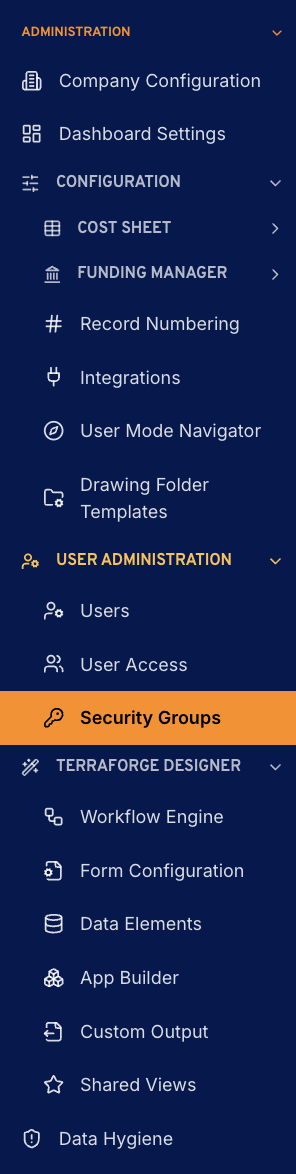
- Company Configuration
- Locale, base currency, time zone. Every money field on the portfolio reads the organisation.
- Dashboard Settings
- Widgets and tabs on the organisation dashboard and the Operations Wall. A new chart is configuration.
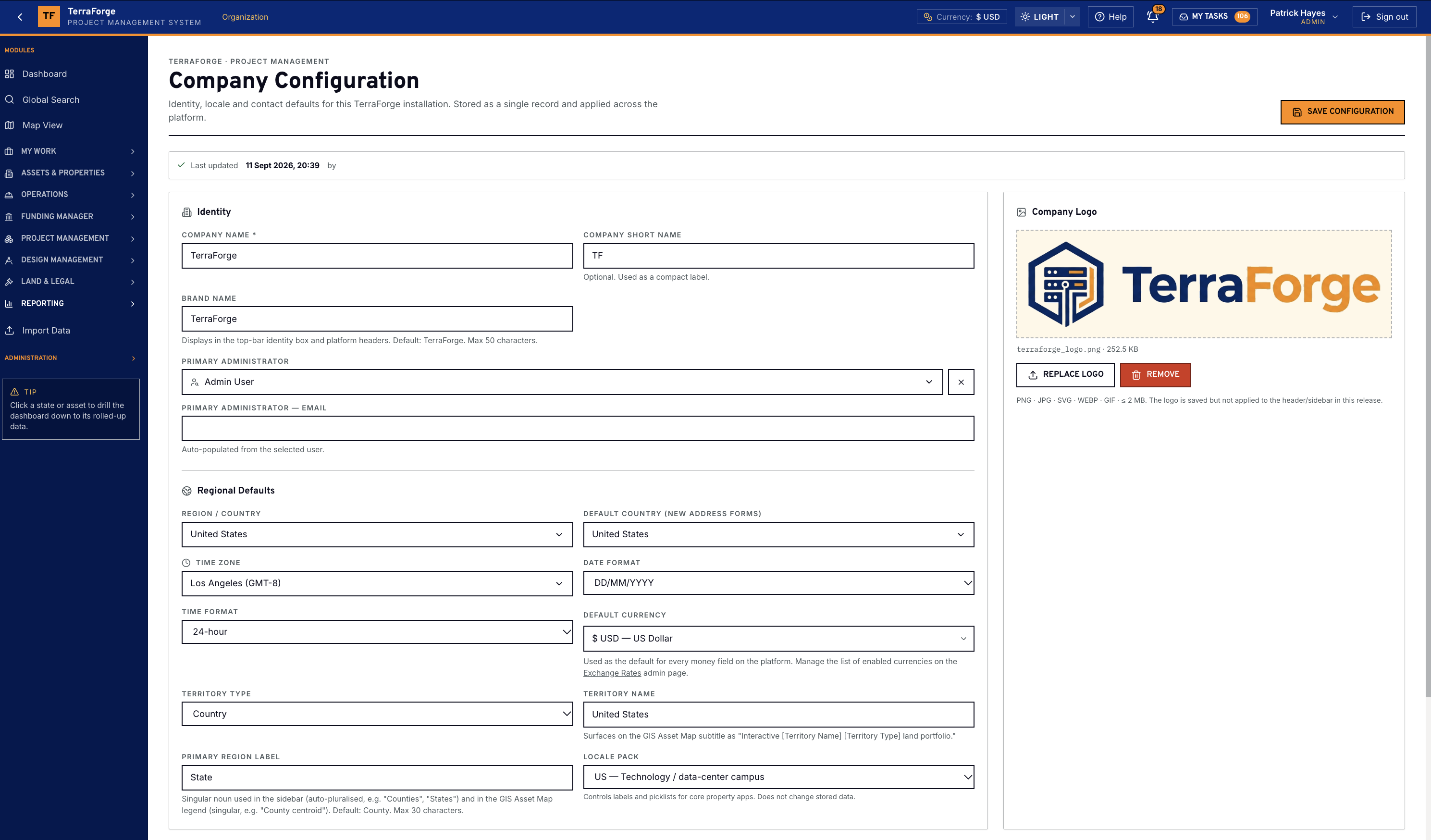
- Cost Sheet
- Codes, columns, exchange rates, cash-flow curves. Generators, switchgear and liquid cooling roll the same way on the programme and the project.
- Funding Manager
- Fund codes and fund-sheet columns. Corporate capex, debt, grant, partner equity and operating budget stay separate colors of money.
- Record Numbering
- Sequential IDs, set once per register. The next payment application, RFI or work order takes the next number.
- Integrations
- Scoped keys, webhooks and the Power BI reporting feed. Primavera P6 moves by XER or XML on Schedule Manager — not a custom integration build.
- User Mode Navigator
- The left-hand nav the programme team sees. Group it, order it, hide what a role does not need.
- Drawing Folder Templates
- The drawing disciplines you actually file, laid onto a programme or a project.
- Users
- Named accounts for the people on the programme. The portfolio administrator creates them. Self-registration stays off.
- User Access
- Which programmes and projects an account can open. The scope sits on the person, and the records underneath honour it.
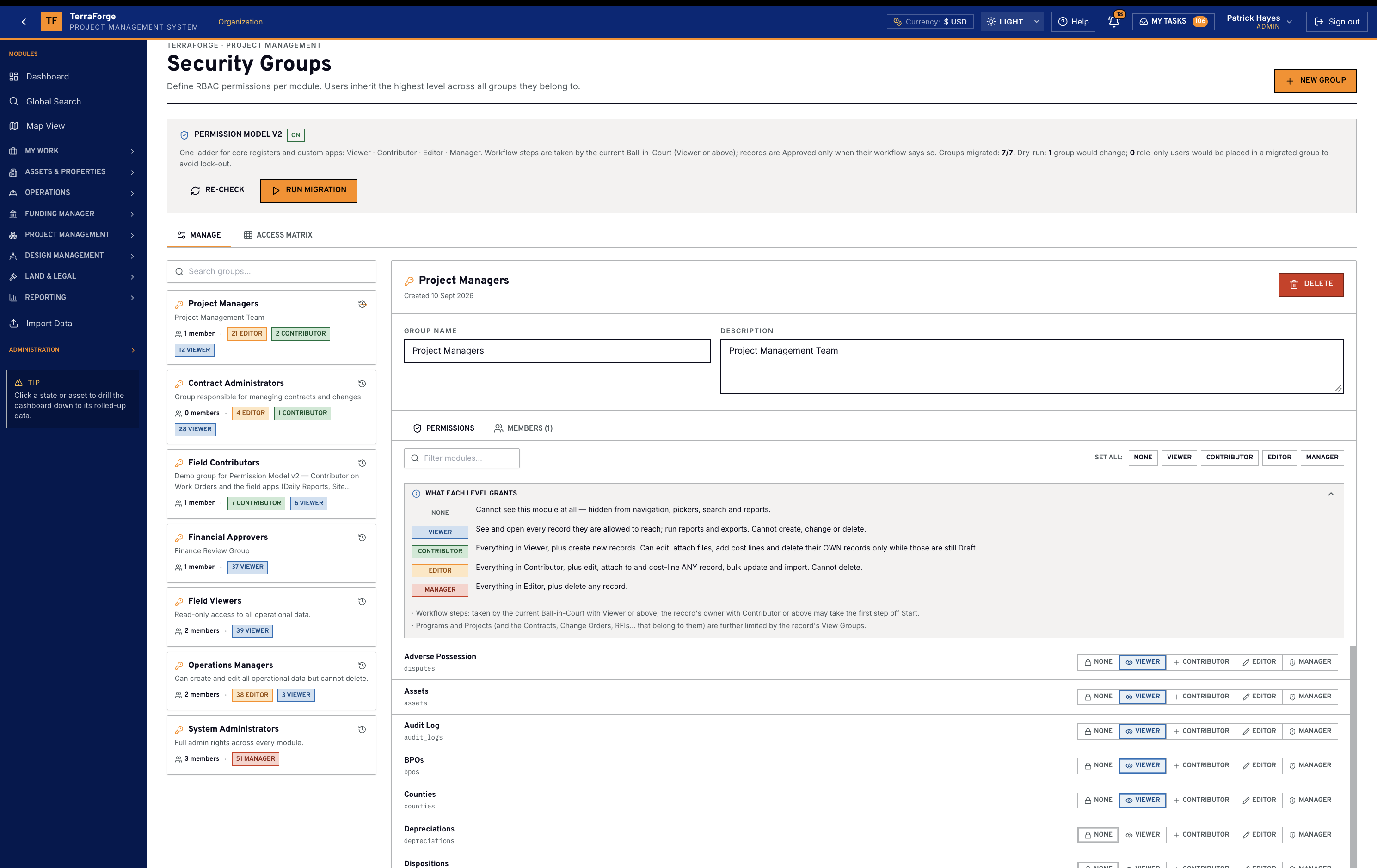
- Security Groups
- Viewer, Contributor, Editor, Manager. Who can see a campus changes here, not on a services ticket.
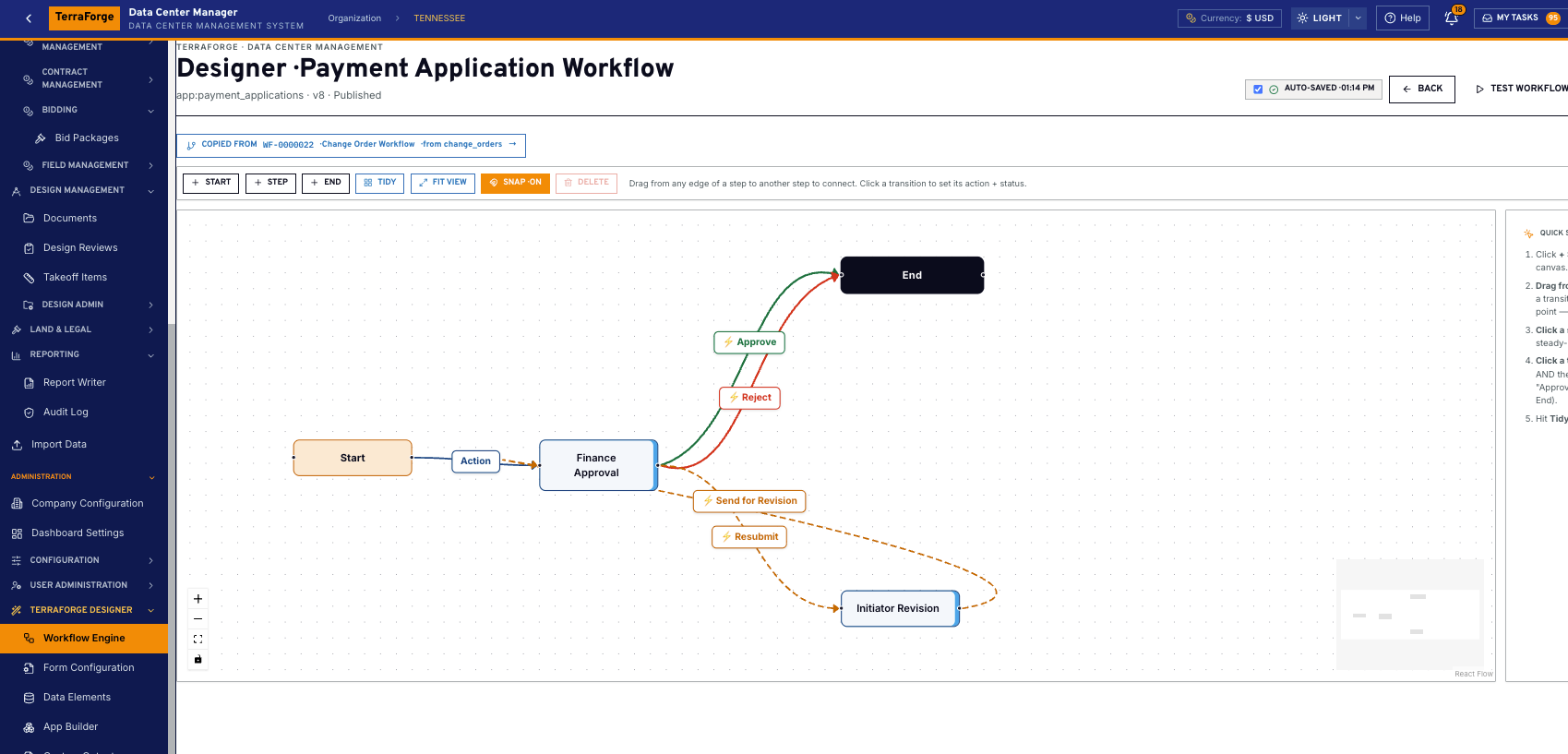
- Workflow Engine
- Start, step, end. Amount, fund, role. Ball-in-Court and the working-day clock land in My Tasks.
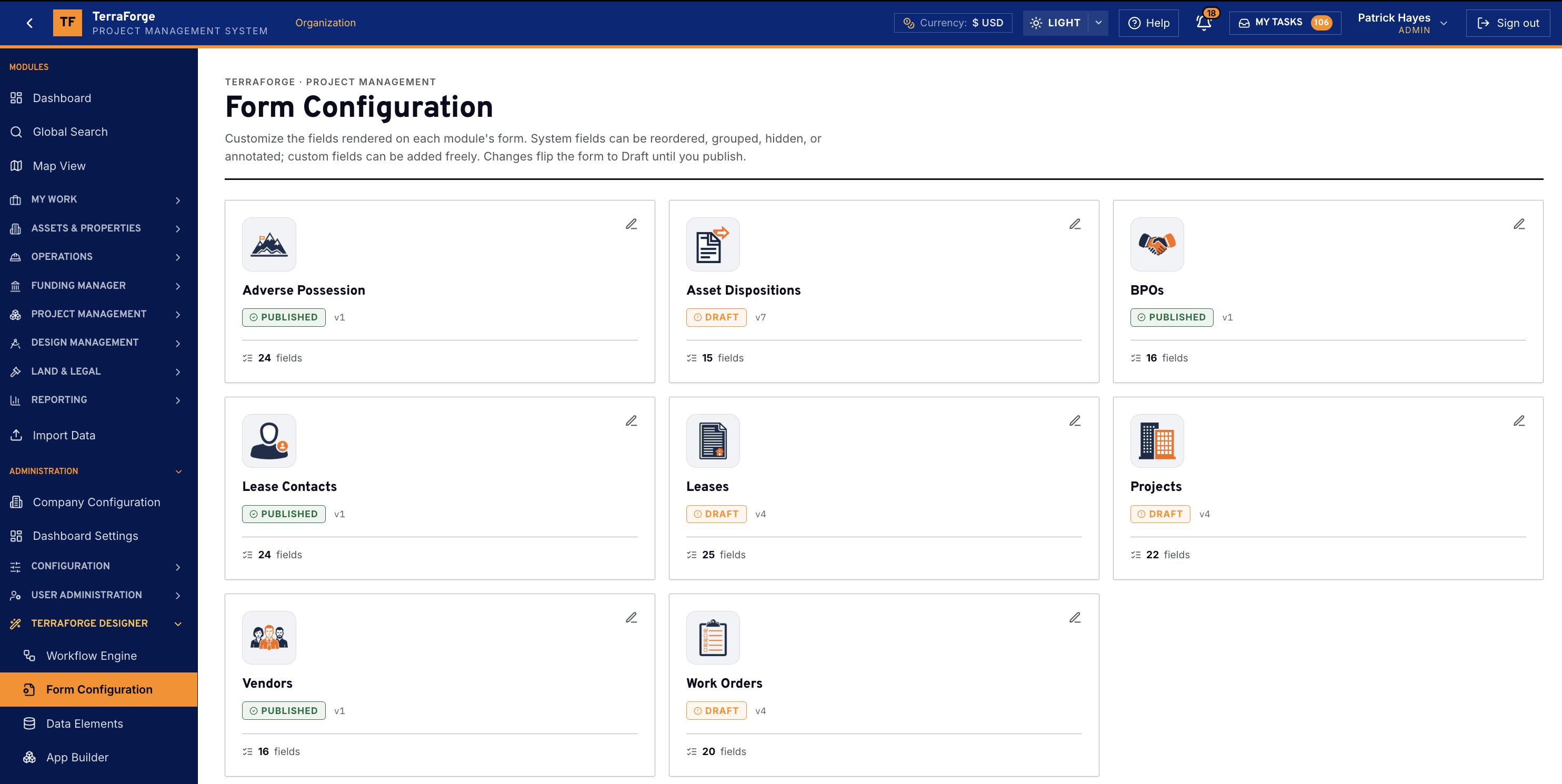
- Form Configuration
- The form the business process opens. Layout, required fields, statuses — changed in the product.
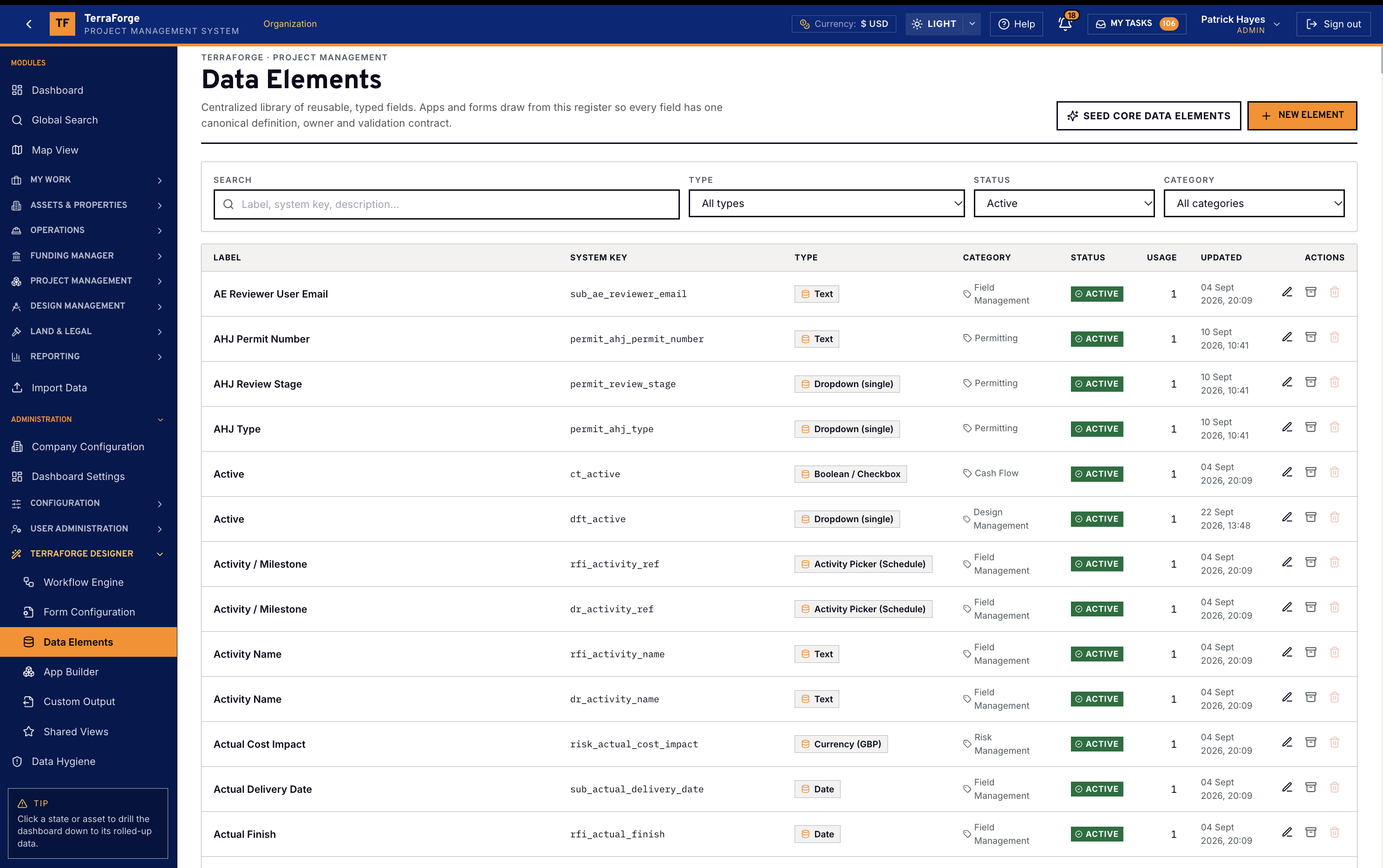
- Data Elements
- One typed field, one owner, one validation. Apps and forms reuse it instead of inventing the field again.
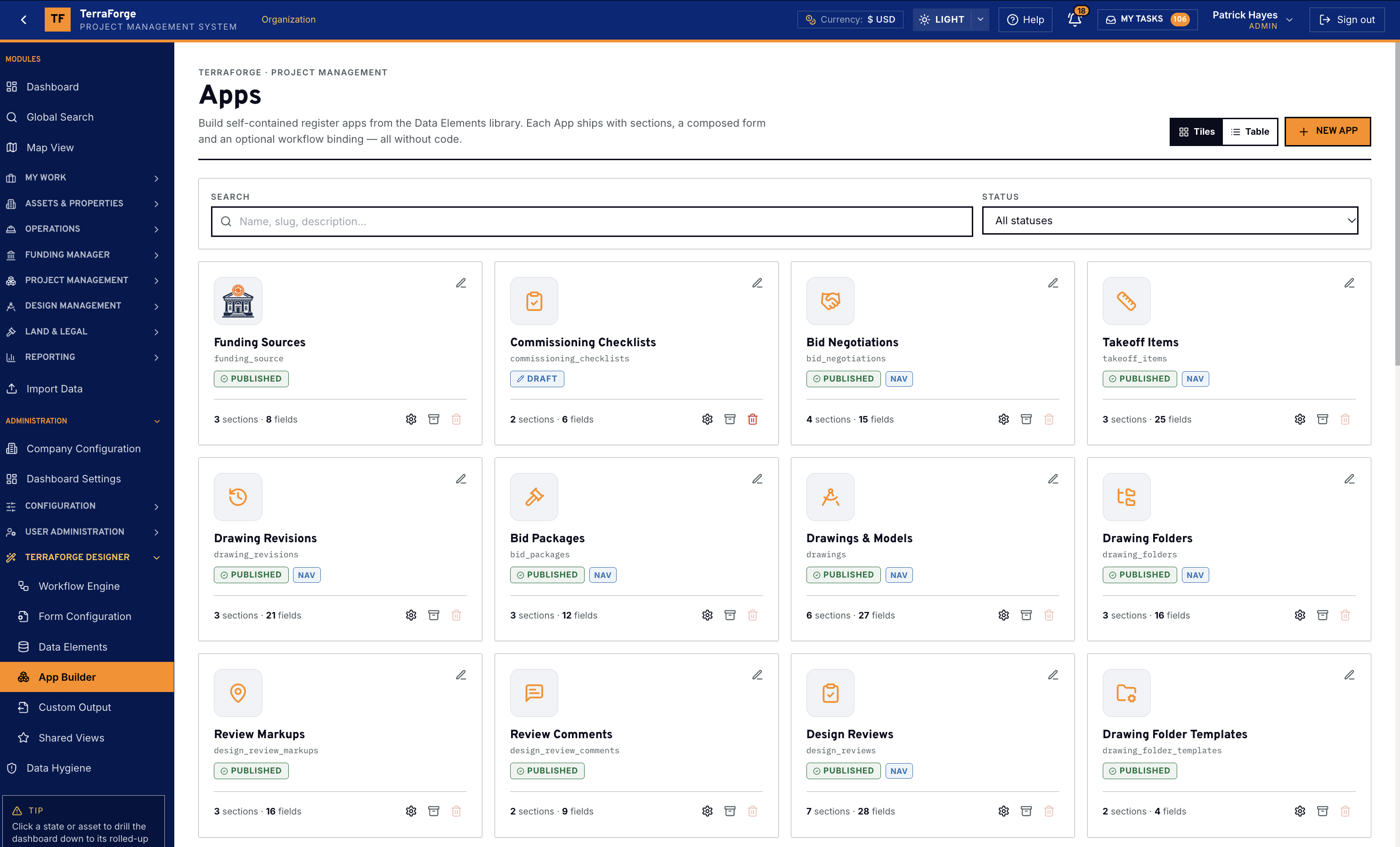
- App Builder
- Sections, a form, a workflow binding, then publish. The RFI and the commissioning checklist are apps.
- Custom Output
- Word mail-merge off the live record. The letter the programme sends is a template.
- Shared Views
- The default a register opens on. An administrator publishes it, and the team stops rebuilding the same filter.
- Data Hygiene
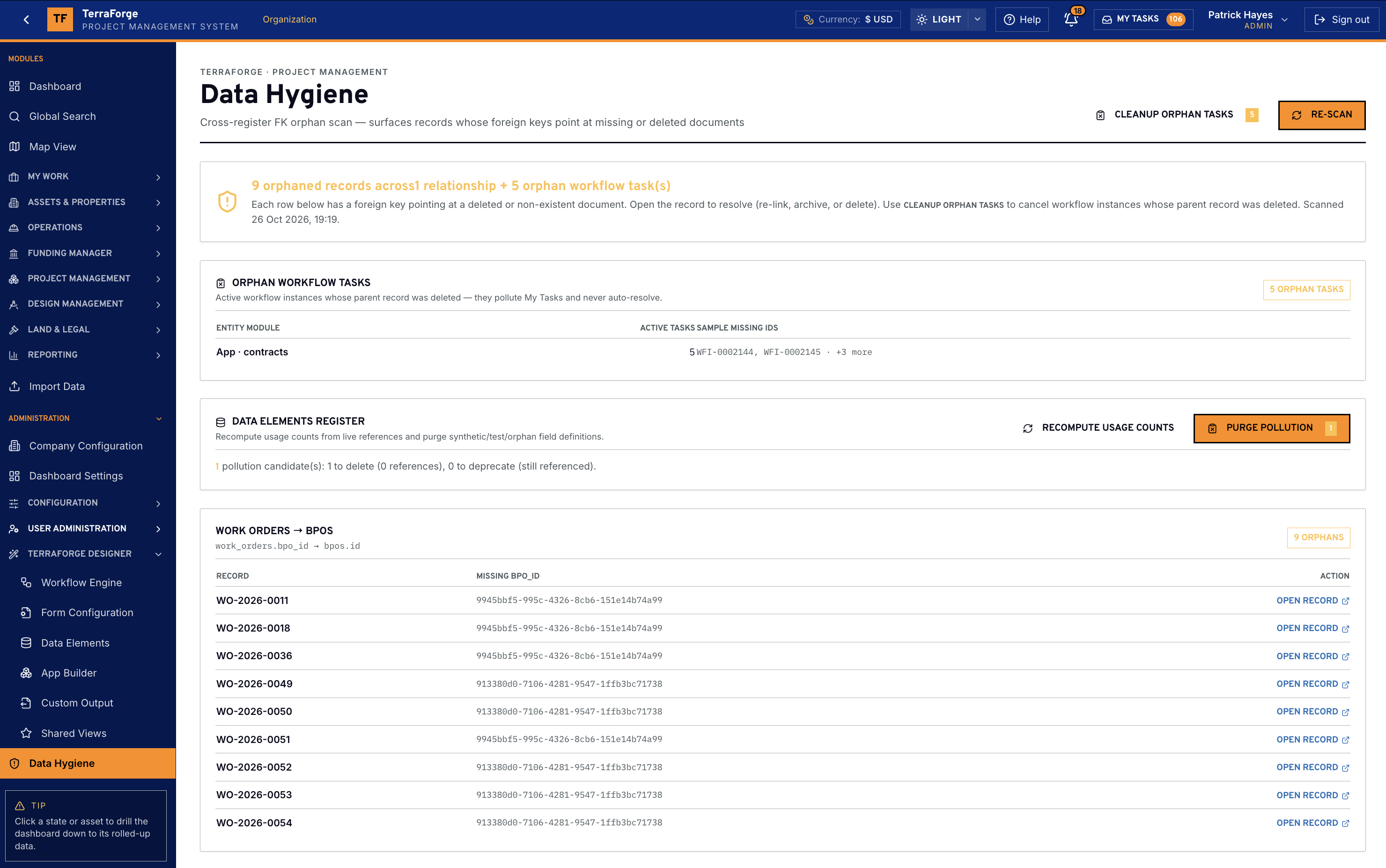
- Orphans, duplicates, the record that never closed. Find it, fix it, re-scan. No downtime window.
Administration
Configuration
User Administration
TerraForge Designer
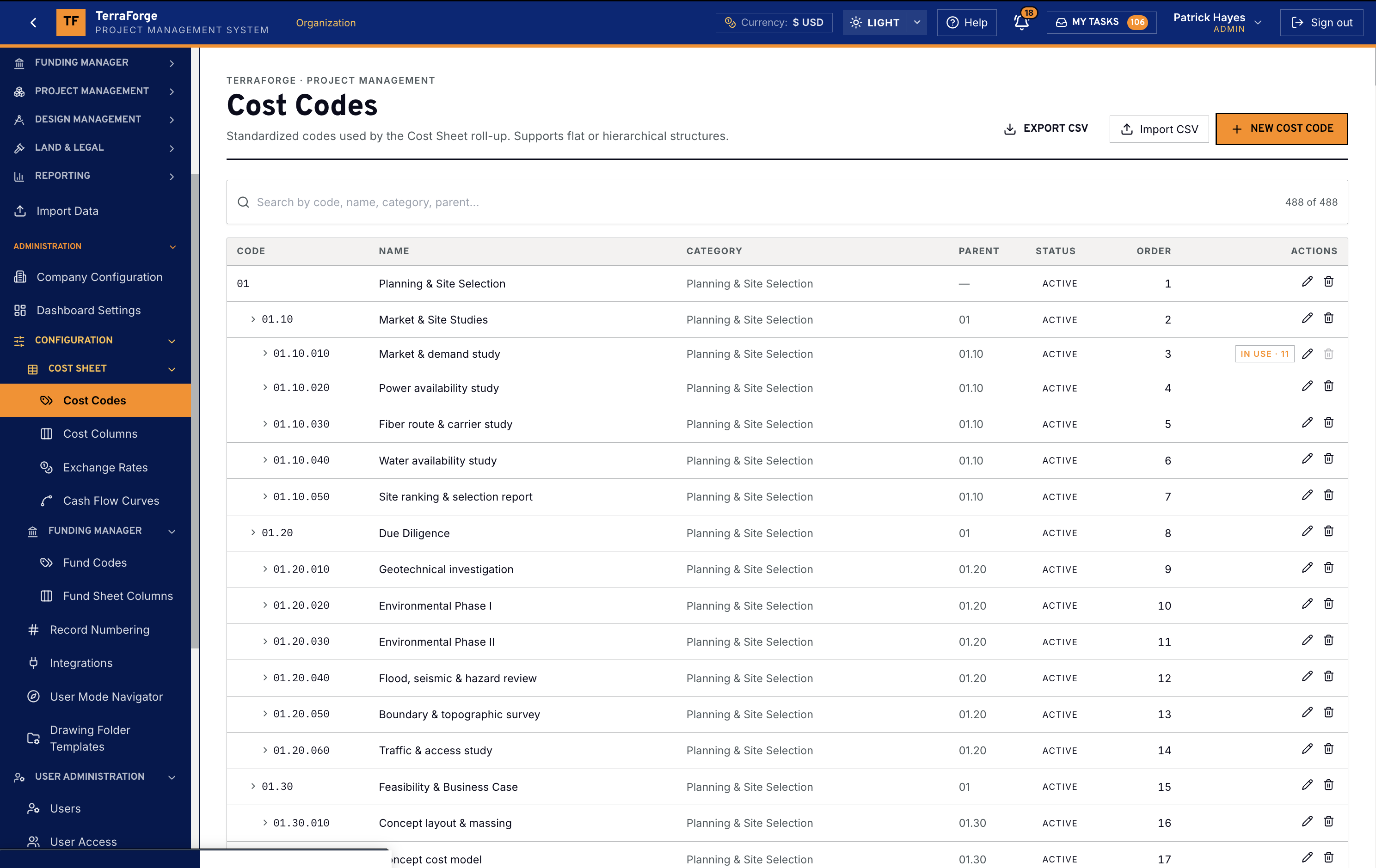
Company Configuration
Brand, currency, region — set once. Every money field reads it.
Legacy PMIS administrators already know where company properties live. TerraForge puts them in the same conceptual place. Currency and region are organisation settings. This demonstration is the United States: Los Angeles, US dollars, and the locale pack US — Technology / data-center campus. The Cost Sheet, Fund Sheet, portfolio and every published app read them. Dated FX on the sheet. Not a per-project workaround. Not a vendor ticket.
Dashboard Settings
Widgets, tabs, wall display, reorder. Summary versus Asset, Lease, Project or Field. A new chart is configuration, not a statement of work.
Cost Sheet configuration
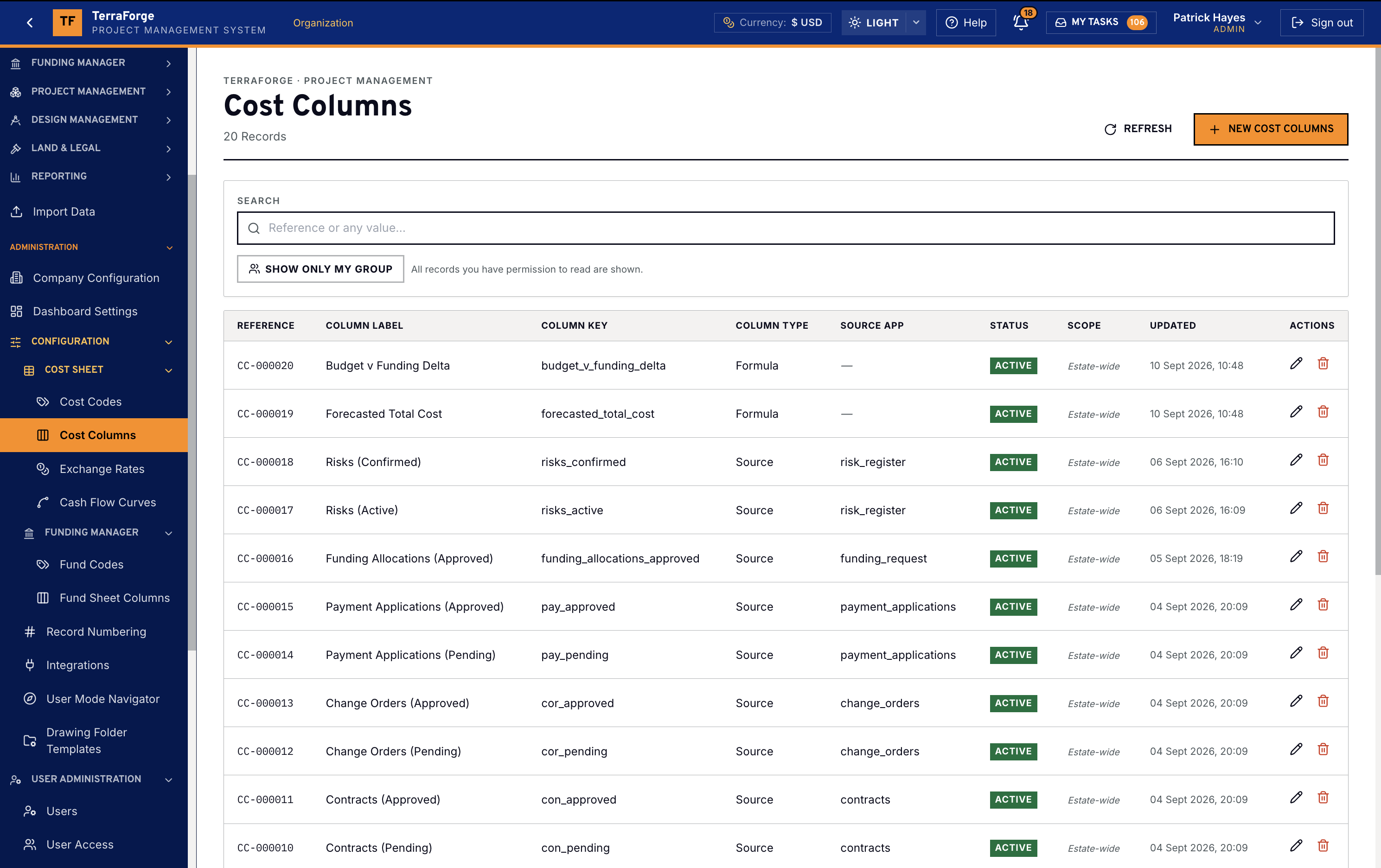
Cost codes and columns — the arithmetic the Cost Sheet actually rolls.
If the cost structure cannot be yours, the rest of the PMIS is theatre. An administrator sets the Cost Codes — the hierarchical WBS — and the Cost Columns the sheet computes: Initial, Changes, Transfers, Revised, Committed, Actual, Forecast, Remaining.
Exchange Rates and Cash Flow Curves
Multi-currency is a company setting. The rate on the sheet is dated. Curve definitions Cash Flow Manager applies to a Cost Sheet column. Steepness and skew live on the curve — not in a planner’s spreadsheet for the monthly pack.
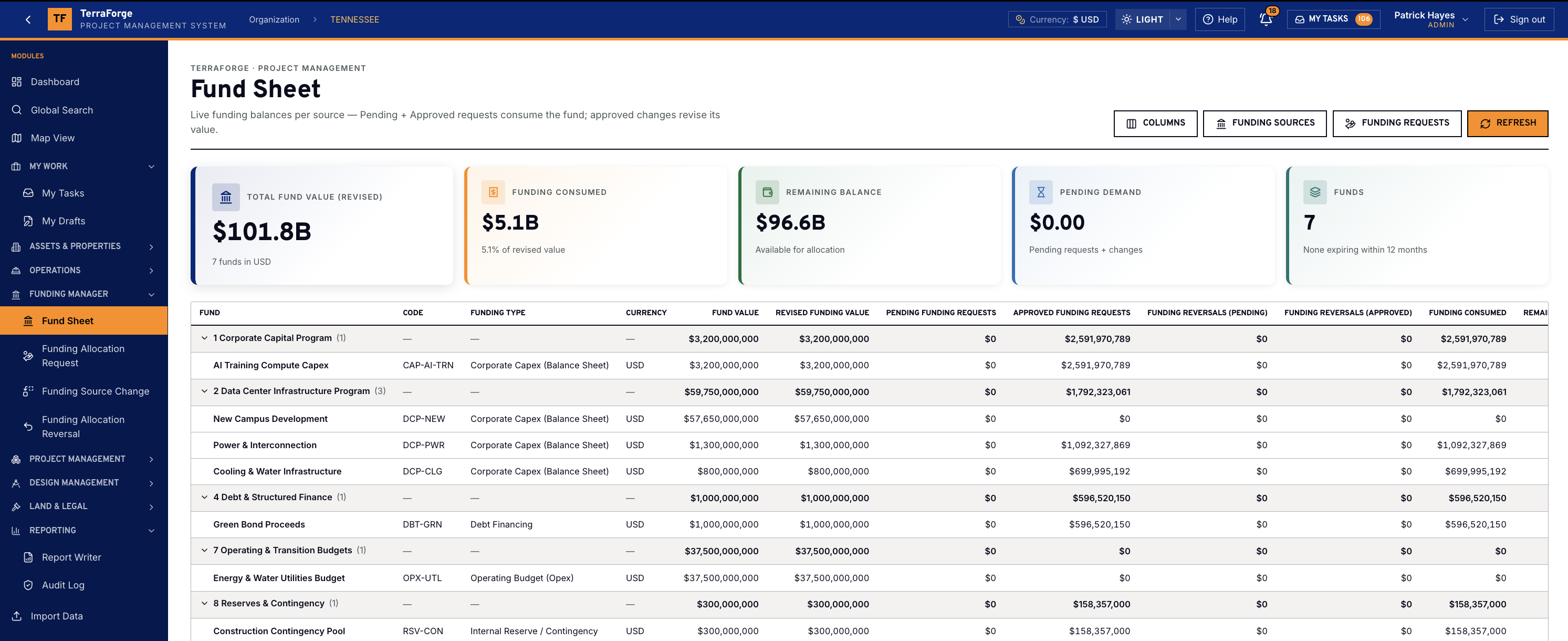
Funding Manager
Fund codes and Fund Sheet columns — colors of money, configured.
Corporate capex is not a government grant, and a grant is not partner equity. Fund Codes lock the name, the type and the funding-breakdown group onto the source. A source expiring within 12 months is flagged on the live sheet. Fund Sheet Columns decide what the sheet shows — revised value, pending and approved requests, reversals, consumed, remaining, expiration.
This is the admin half of Funding Manager. The live sheet the controller opens is on the Product tour.
Record Numbering
Configurable prefixes per business process — on create, not later.
SCH-, WO-, CNT-, LEA-, the app you published last Tuesday. Numbers land when the record is created. You do not bolt a numbering scheme on as an integration six months after go-live. Legacy PMIS people will look for this on day one. It is here.
User Mode Navigator is the left-hand nav users actually see. Group business processes, set order, hide what a role does not need — without a second product.
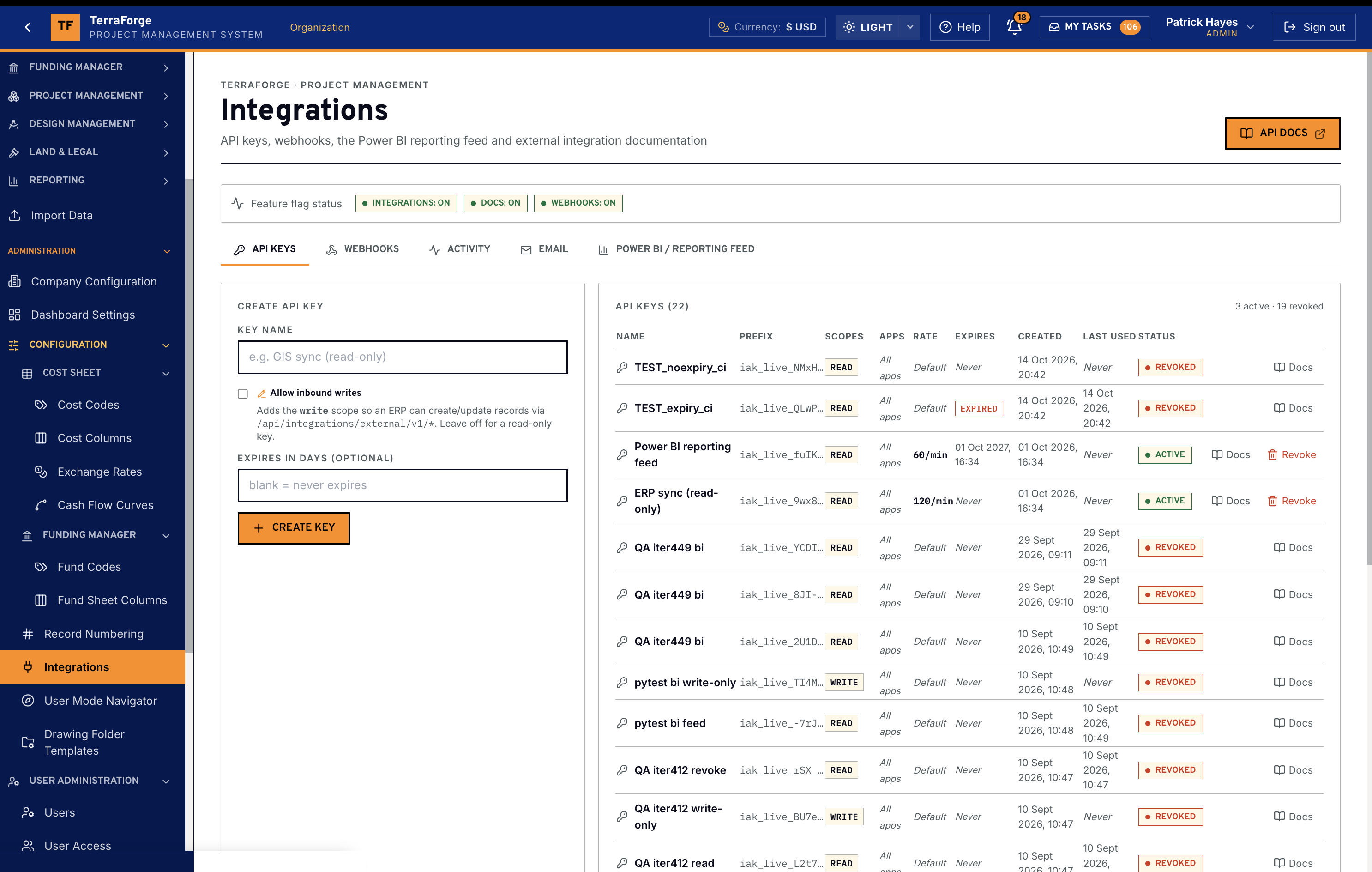
Integrations
Open REST and signed webhooks. P6 by XER or XML.
Every published app is on an open REST API — scoped keys, allowed-apps restriction, optional expiry. The API Keys tab is that list, including the Power BI reporting feed. The Power BI / Reporting Feed tab is the read-only feed. HMAC-SHA256 webhooks are thin: field data does not leave on the envelope. Primavera P6 is a file exchange — XER or XML, updated in place — not a live two-way link. The schedule itself is Schedule Manager.
User Administration
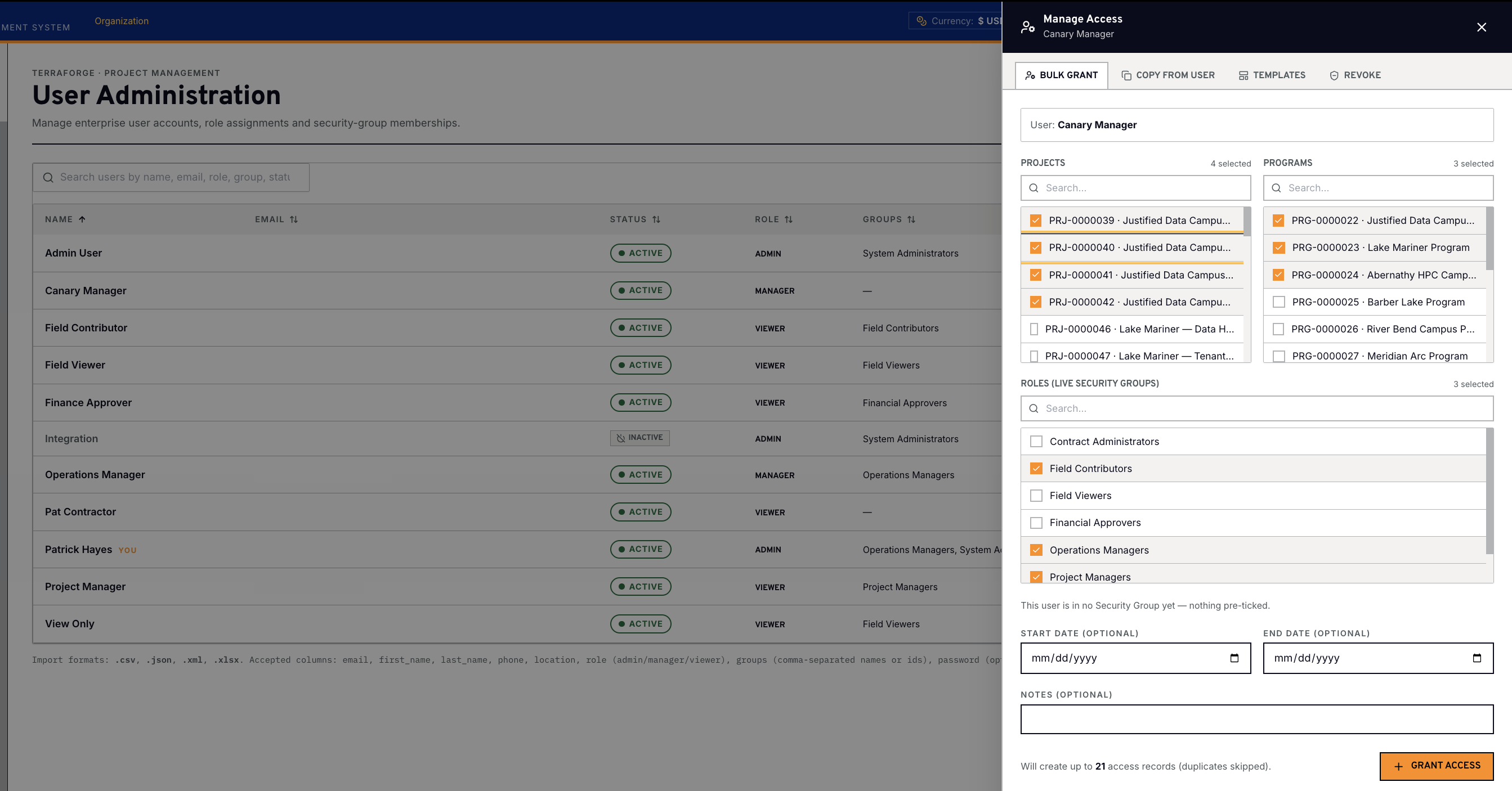
Users, access, security groups — one permission ladder, with programme scope.
A PMIS that cannot answer “who can see this project?” does not survive an owner-side security review. TerraForge ships Users, User Access and Security Groups as first-class Administration.
Users inherit the highest level across every group they belong to. Permission Model V2 is one ladder: Viewer, Contributor, Editor, Manager. View Groups on programmes and projects; child records and dashboard widgets honour the same gate. Manage Access writes that scope in one pass — projects, programmes and live security groups — and skips a grant the user already holds.
Audit — what changed?
Immutable trail: every create, update, delete, login and import. Click a row and the panel is a field-level diff — what it was, what it is, who, when. Completed workflow fields lock; the API refuses the write. The control list is on Security.
TerraForge Designer
App Builder, forms, data elements and workflow — this is where they live.
This is the capability most enterprise PMIS products apologise for not having. In TerraForge it is Administration — not a side tool and not a consultancy engagement.
App Builder composes a business process from the Data Elements library — sections, a form, a workflow binding — then publishes. RFI, Daily Report, Site Incident, Initial Budget, Contracts, Payment Applications: they are apps. Publish on Tuesday. The team is in it on Wednesday.
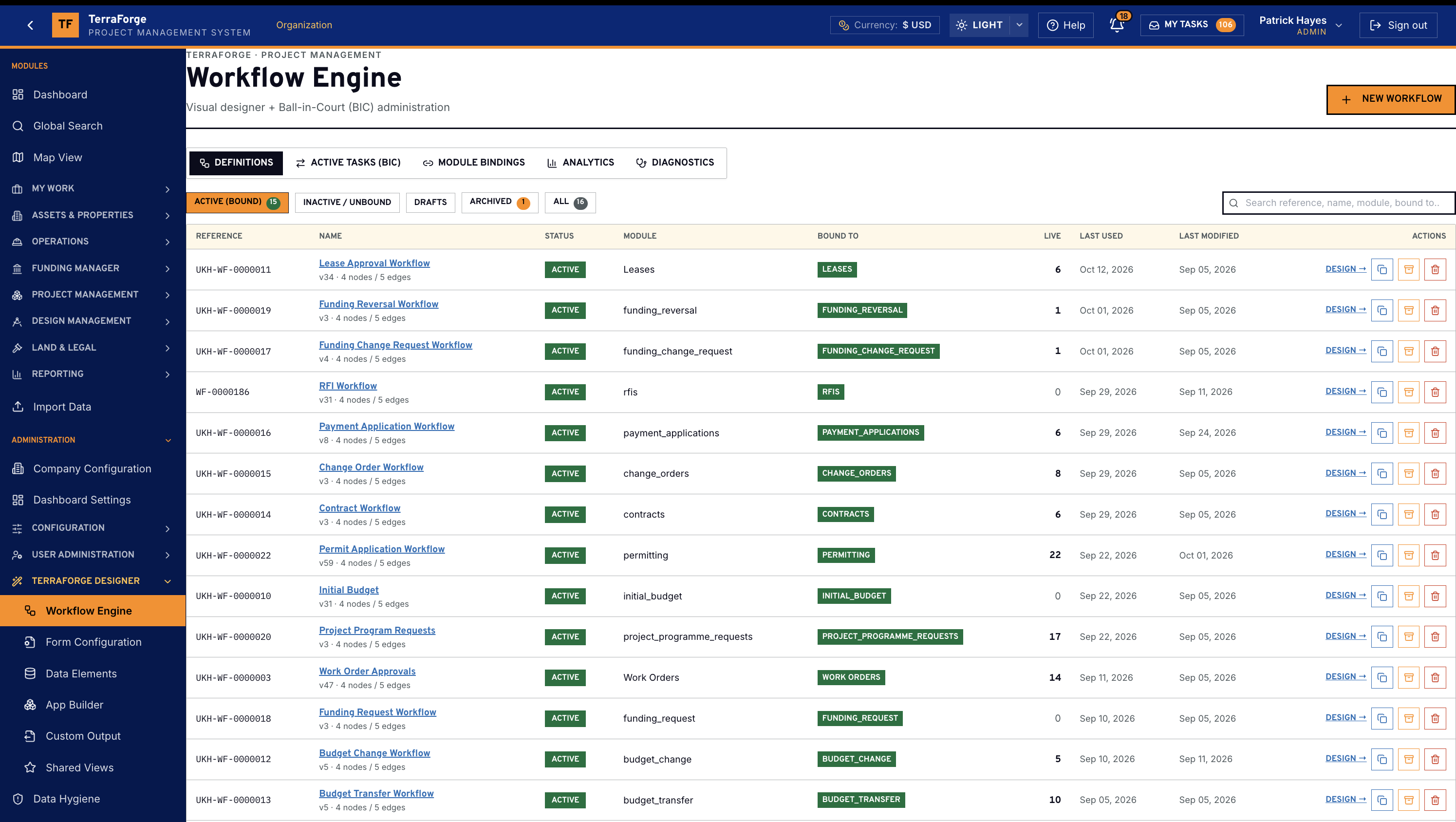
Workflow has its own section below: production-ready processes on day one, and a visual designer when the approval path is yours.
Forms, Data Elements, Shared Views, Custom Output
Form Configuration is the form the business process actually opens. Data Elements are one typed field library. Shared Views let an administrator publish the default. Custom Output is Word mail merge: drop {{ field }} tokens, test-render, activate.
Workflow Engine
You are not starting from a blank canvas.
TerraForge ships production-ready workflows on the business processes legacy PMIS teams already live in. Go live without a blank page — then open the same designer to extend them, or build the approval that does not exist yet, without code.
Data Hygiene
Orphans, missing keys, dirty load — in TerraForge, not a spreadsheet.
A design-partner launch dies on dirty data. Data Hygiene is where the administrator sees foreign keys pointing at missing documents, orphan workflow tasks and required-field gaps — in the product, not after the load.
Recompute usage on Data Elements. Purge test pollution. Open the work order and fix the master agreement it still points at. Clean up orphan tasks, then re-scan. The same place legacy PMIS people look when they ask whether you can run a clean go-live.
See the full PMIS against your campus programme.
Your cost codes, your workflow, your campuses. Write sales@terraforge.build.