
Solutions · Capital programmes
Budget, the contract family, cash flow, and the schedule.
Contracts
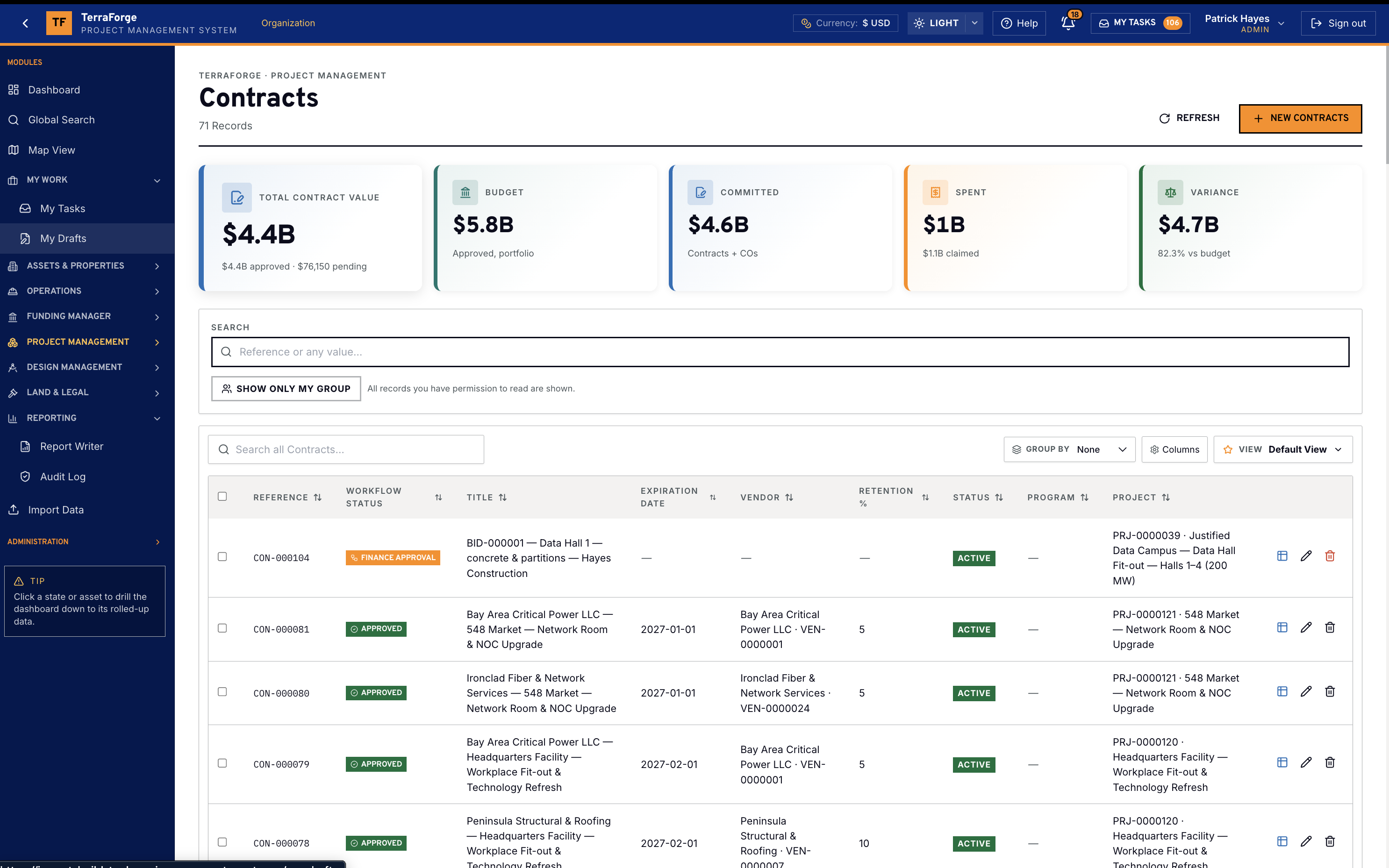
Contracts, change orders, payment applications, then the schedule of values.
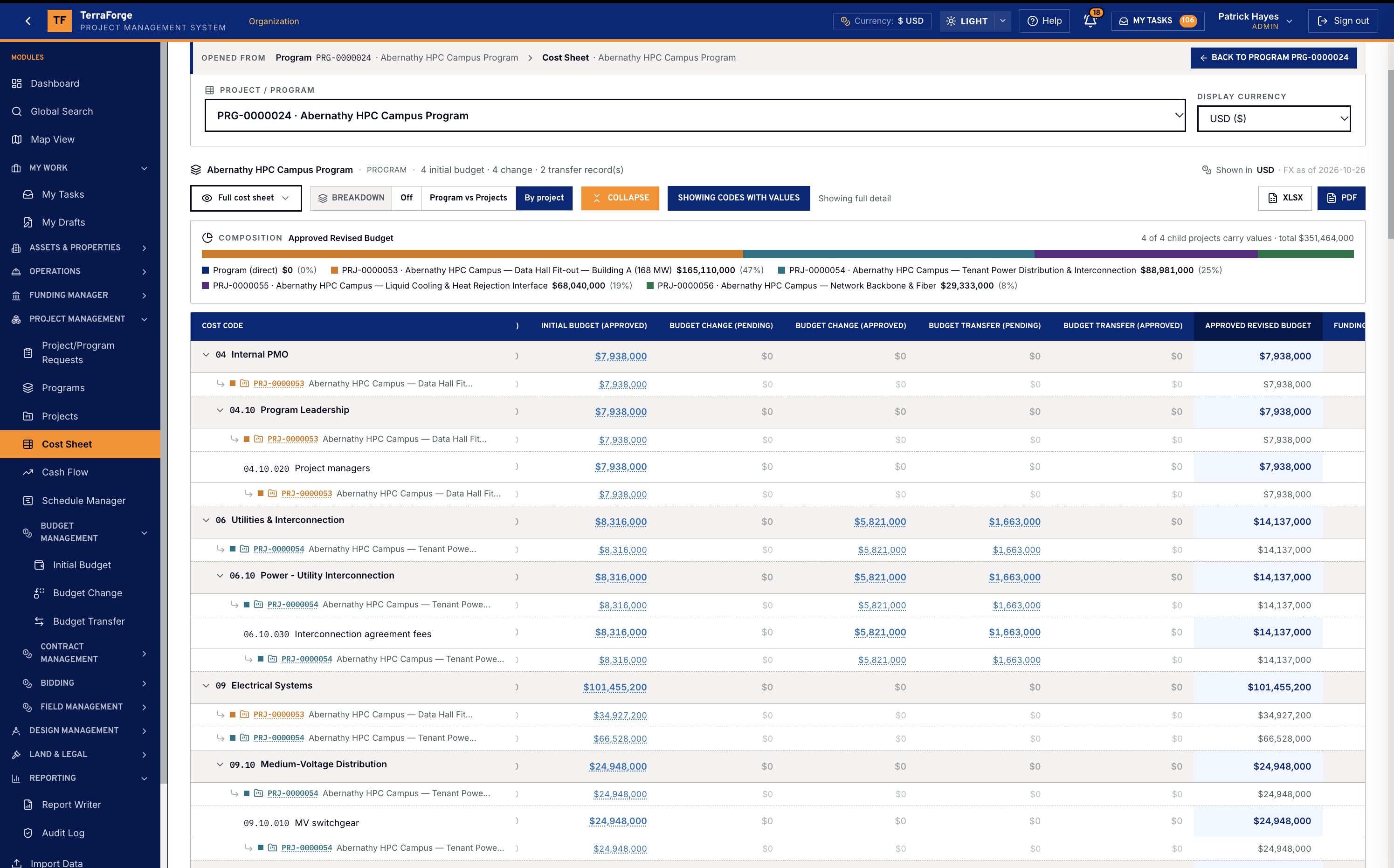
The contracts register feeds Committed on the Cost Sheet. A change order sits on the parent contract. A payment application is the period claim, and approval moves completed and stored. The schedule of values reads the contract, the approved changes and the approved applications on one row per cost code.
Cash flow
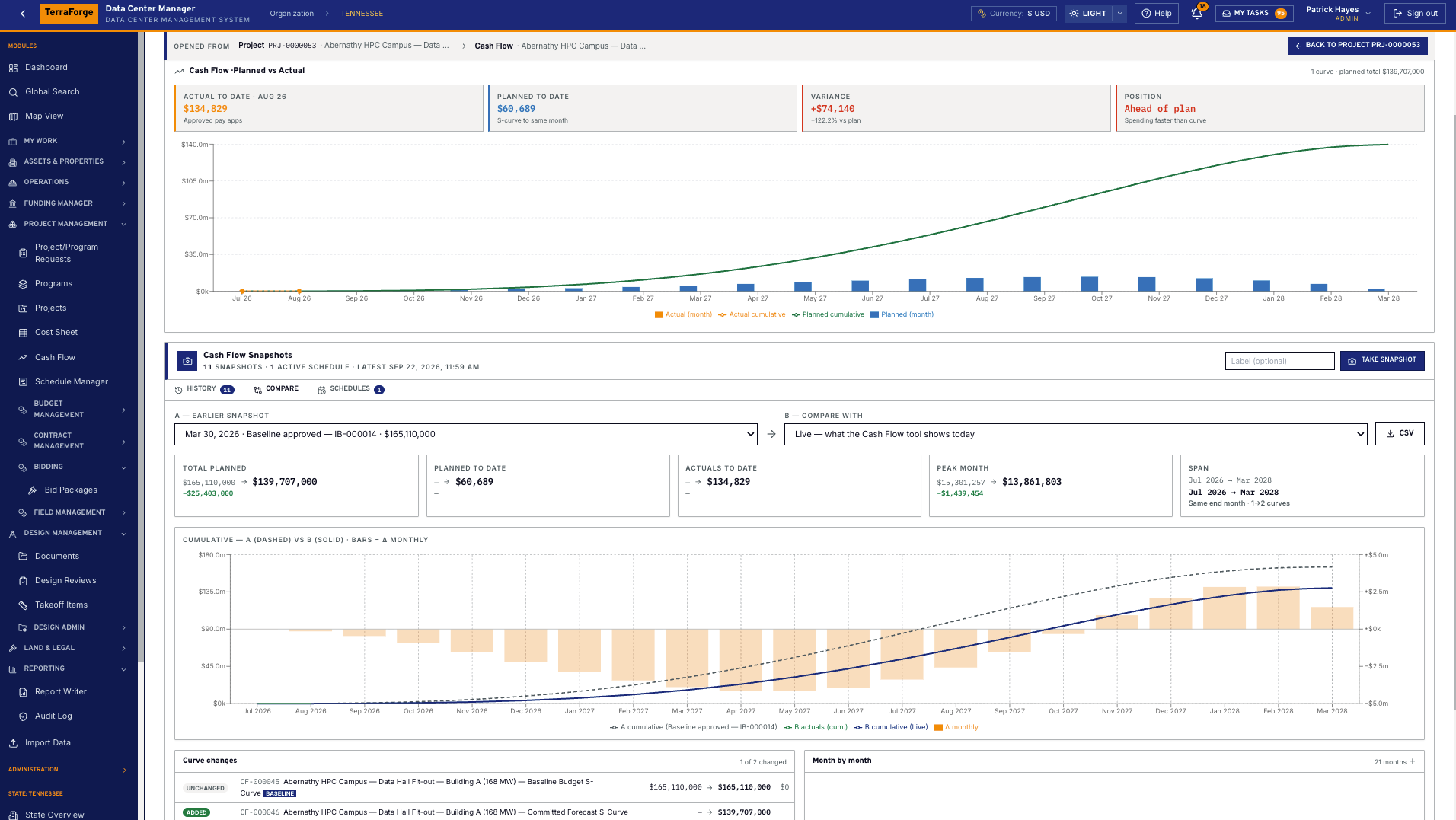
Freeze a baseline. Compare it with the live forecast.
A snapshot freezes the curve. Compare that baseline with the live forecast, or with a later snapshot. Planned to date, actuals to date and the variance sit on the same screen. Actuals are approved payment applications.
Schedule Manager
P6 by XER or XML, updated in place
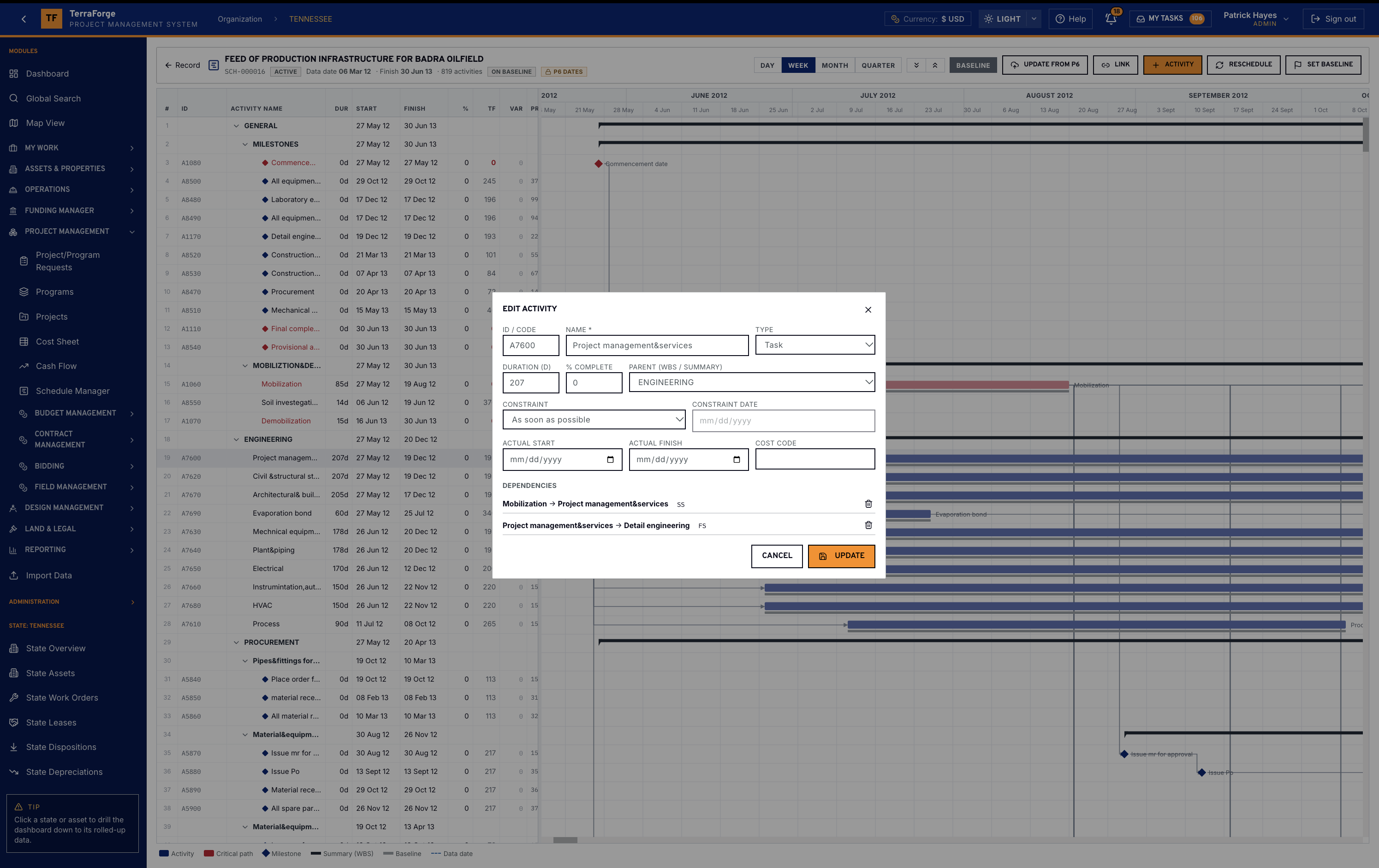
Bring Primavera P6 in by XER or XML, and update that schedule in place. Then open a live WBS Gantt: activities, duration, start, finish, percent complete, total float, variance. Critical path in red. Update from P6, add an activity, reschedule, set baseline — hundreds of activities on one programme.
Funding Manager
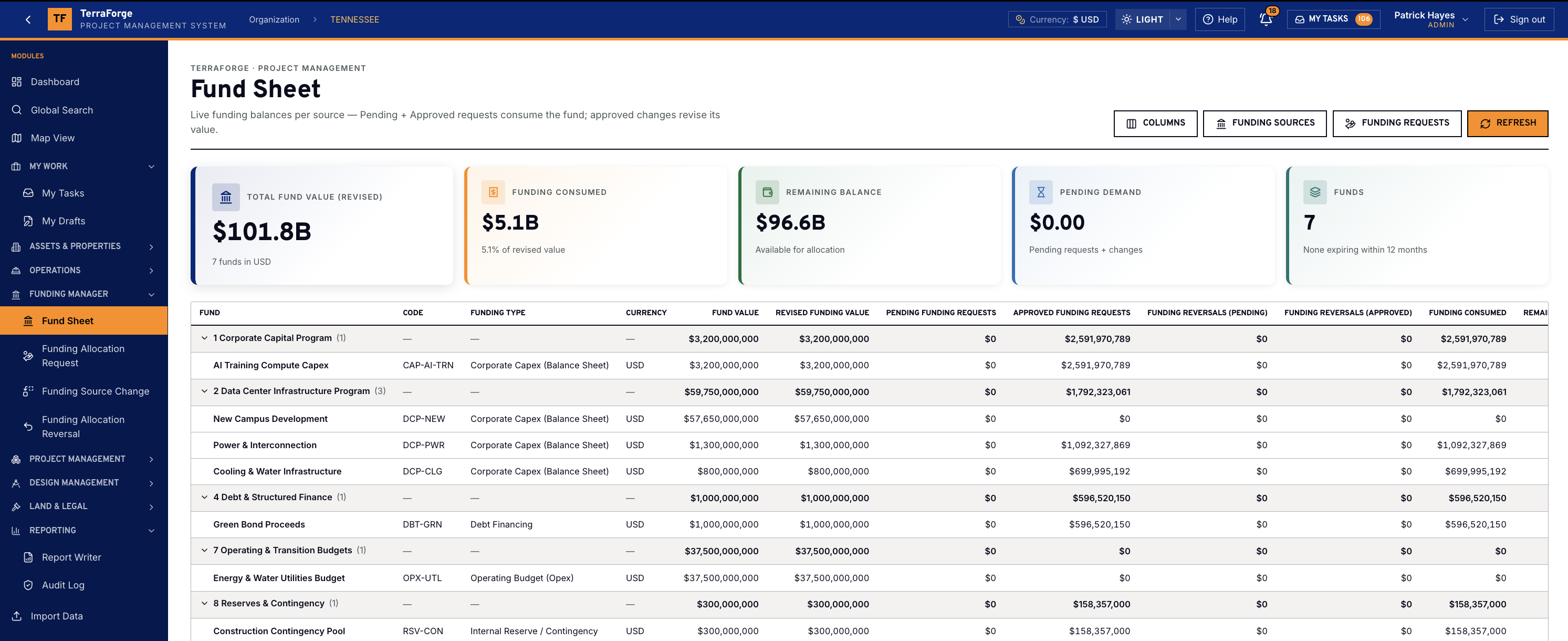
The Fund Sheet is the portfolio view of every color.
The type is governed on the fund code: corporate capex, debt financing, government grant, joint-venture and partner equity, operating budget, lease or sale-leaseback, vendor financing, customer prepayment. The sheet’s figures are revised value, consumed, remaining — revised minus consumed minus pending — pending demand, and funds expiring within 12 months. An allocation splits those sources. The percentages must total 100%, and priority 1 is consumed first. The target is a programme or a project, and the request total is that record’s approved budget position. A source change revises the pot and leaves the original amount. A reversal returns an approved allocation in the same proportions. Approved requests are not edited. The cost sheet at organisation, programme and project shows Funding Allocations (Approved) and Budget vs Funding Δ. The programme and the project each have a Funding tab.
This demonstration Fund Sheet is seven funds in USD: $101.8B revised, $5.1B consumed, $96.6B remaining. Data center infrastructure holds the campus pot, power and interconnection, and cooling and water. The nav on that record is the allocation request, the source change, and the reversal.
Global Search
One search across every business process and every app you have published.
Not a module-by-module hunt. One query across text, number, status, date and notes — every business process and every published custom app. Per-module chips. A project controller types an asset ID, a contract number, a work-order ID or a field on an app the admin published last month — and the record opens. Legacy PMIS tools do not have this today.
What ships
Budget, contracts, cash flow, schedule, then funding.
Hierarchy
- Programmes
- The portfolio container. Roll-up is native, not a report someone built.
- Projects
- The job. Budget, contracts, schedule and location sit on it.
- Project / programme requests
- The front door for a new capital job — numbered, governed, searchable.
Cost & budget
- Cost Sheet
- Hierarchical codes. Initial, change, transfer, approved revised. Multi-currency with a dated FX rate — currencies come from Company Configuration.
- Initial budget
- The sanctioned baseline, as a business process — not a locked spreadsheet.
- Budget change
- Pending and approved in their own columns.
- Budget transfer
- Movement between codes, with the same pending / approved split.
Contracts
- Contracts
- Titles, counterparties, values — feeding committed.
- Change orders
- Against the parent contract, not a parallel tracker.
- Payment applications
- Actuals from the same family of business processes.
- SOV
- Schedule of values on the contract.
- Risk business process
- On the project, in the same search as the rest.
Cash flow & schedule
- Cash Flow Manager
- S-curve linked to a Cost Sheet column. Project, cost code or contract. Steepness and skew sliders — front-load or back-load. Monthly bars, cumulative, export.
- Schedule Manager
- WBS Gantt: activities, critical path, milestones, baseline, total float, variance. Day / week / month. On baseline, P6 dates, Update from P6, reschedule.
- P6 — XER & XML
- Import Primavera P6 by XER or XML and update that schedule in place. Keep the TerraForge baseline so slippage is computed here.
- EVM
- Live from portfolio to project to cost code — not a monthly extract.
Funding Manager — colors of money
- Funding Manager
- Where the money comes from. Sources, the Fund Sheet, allocation, source change and reversal — one manager.
- Colors of money
- Corporate capex, debt financing, government grant, partner equity, operating budget, lease or sale-leaseback, vendor financing, customer prepayment. The type is set on the fund code.
- Fund Sheet
- Every pot, grouped by the funding breakdown structure. Revised value, consumed, remaining, pending demand, and funds expiring within 12 months.
- Funding Allocation Request
- Split across sources to 100%. Priority 1 is consumed first. Target is a programme or a project. The request total is that record’s approved budget. Approved requests are immutable.
- Funding Source Change
- Revises a pot’s value. The original amount stays. The audit is the list of approved changes.
- Funding Allocation Reversal
- Returns an approved allocation to its sources in the same proportions.
Drillable dashboards
- Global Search
- Find an asset, a project, a schedule, a drawing or a contract — every register and every published custom app. Open the live record and return to the results. Most legacy PMIS cannot.
- Business process dashboards
- Initial budget, changes, contracts, payment applications — each ships tiles, recent records and status. Not a separate BI tool.
- Visual metrics
- Cost by category, top drivers, spent bars, allocation. The widgets read the business process the workflow already governs.
- Drill
- Organisation to programme to project — click through. The widgets follow the record you opened.
See the full PMIS against your campus programme.
Your cost codes, your workflow, your campuses. Write sales@terraforge.build.