
01
Three records, one container
Folder, drawing and revision. Each belongs to exactly one programme, project or asset.
Drawings & takeoffs
01
Folder
A tree on the container. A template lays down the standard set in one click.
02
Drawing
Number, title, discipline, 2D or 3D. The drawing never holds the file.
03
Revision
The issue. P01, P02, C01. The file, and the takeoff calibration, live here.
04
Measure
Length, area or count on PDF or DXF. Cost code required.
05
Include
Draft, Included or Excluded. Only Included rolls up and loads a bid.
01
Folder, drawing and revision. Each belongs to exactly one programme, project or asset.
02
Newest non-inactive revision by date. A newer file does not move measures already taken.
03
Length, area or count, the page, the revision and the cost code. Included items load the bid.
Drawing management
Design Management files every drawing and model for a programme, a project or an asset. Folders nest. A folder template can lay down a standard set — architectural, structural, MEP, models, specifications, shop drawings, archive — without touching drawings that are already there.
The drawing is the number, the title, the discipline, 2D or 3D, and the native format: PDF, DWG, DXF, IFC, RVT. Current revision is always the newest non-inactive revision by date. Whatever is typed in that field is ignored. Revision codes are labels. A P03 dated before P02 is not the latest.
One revision can be flagged Issued for Takeoff. Takeoff, markups and bid lines pin themselves to it. When nothing is flagged they use the latest. Uploading a newer file never moves existing measures. The sheet says the drawing is now the new revision, the measures stay on the old one, and Compare shows what moved.
2D takeoff
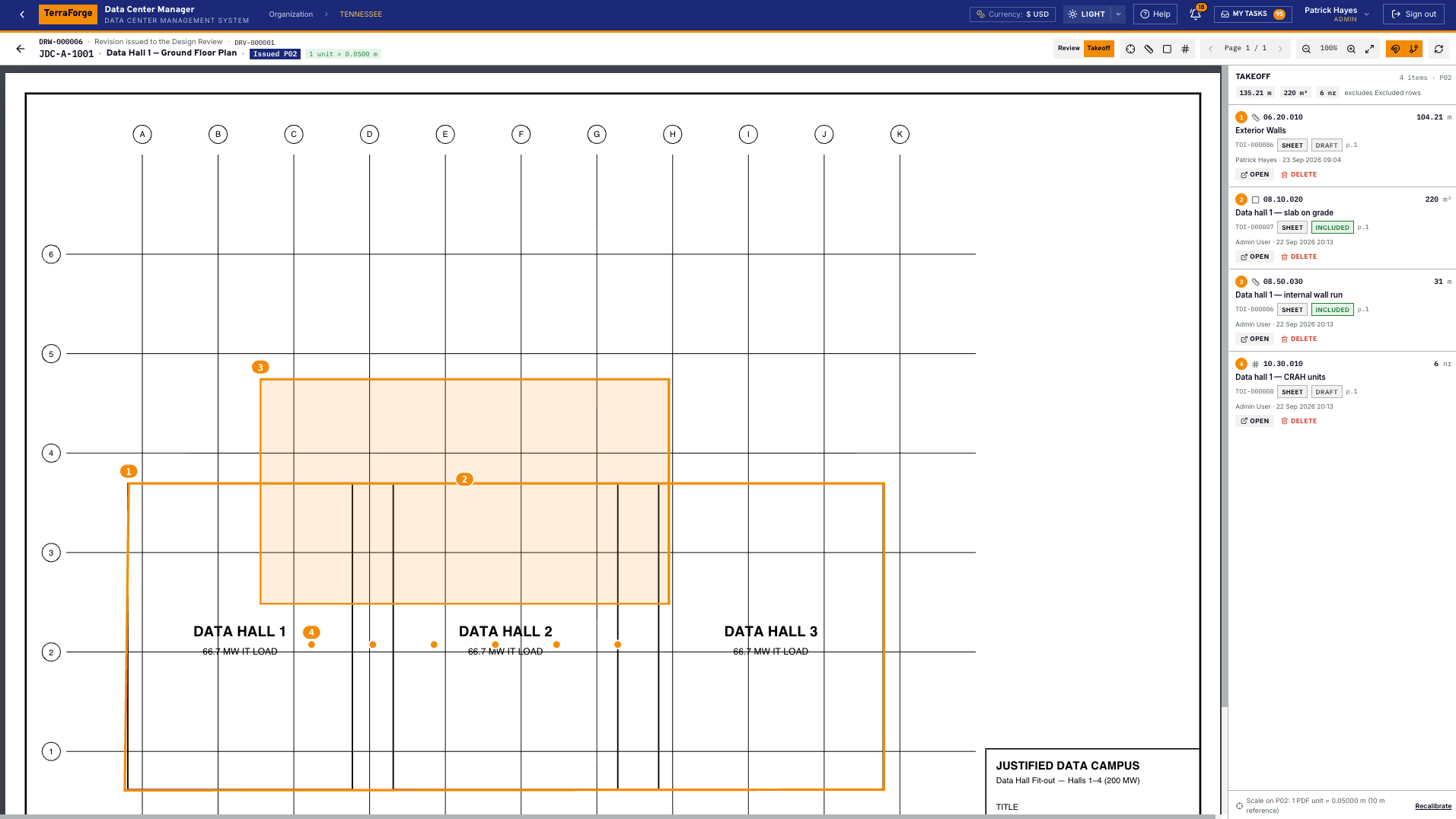
Open the issued revision from the drawing, from the documents explorer, or from the Takeoff tab on the programme or project. Calibrate once — a known length — and every length and area on that revision uses the scale. A new revision is calibrated again.
Measure length, area or count. The quantity is computed from the geometry. You may adjust it by a hundredth, not rewrite it. The item stores the drawing, the revision, the page and the cost code. Status is Draft, Included or Excluded. Only Included items roll up by cost code and load onto a bid package.
PDF and DXF can be measured. DWG, images and 3D models cannot — issue a PDF or DXF revision. When a newer revision is published the item does not move. The bid keeps the frozen bill of quantities until someone reloads it from takeoff.
What ships
Your cost codes, your workflow, your campuses. Write sales@terraforge.build.